
Key facts
- Manuals
- 1
- Languages
- EN
- Last added
- 2023-10-20
Featured Studio Dice manuals
Studio Dice Remote Duel Set Up Guide
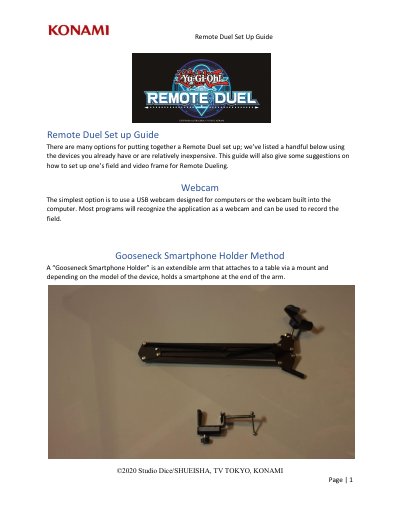
This guide explains how to set up equipment for Remote Duel using devices like webcams, smartphone holders, and tripods. It covers mounting options and connecting smartphones to computers or other devices for video calls. The guide also includes instructions for playing without a computer using screen mirroring or HDMI adapters.
The guide advises following manufacturer instructions for all equipment and checking device compatibility. It includes tips for positioning equipment to avoid obstructing the monitor or Dueling area, and instructions for using camera apps to configure devices as webcams or for screen mirroring.
Covers: Webcam Setup · Gooseneck Smartphone Holder · Tripod and Smartphone Mount · Connecting Smartphone to Computer · Playing Without a Computer · Screen Mirroring
Latest Studio Dice manuals
Studio Dice Remote Duel Set Up Guide
User Manual 6 pages · 753 KB · ENA guide to setting up equipment for Remote Duel, including webcams, smartphone holders, and connecting devices for video calling.
Which document do I need?
User Manual
Day-to-day operation, settings and troubleshooting. Start here if the product is already set up.
Questions answered in Studio Dice manuals
Can I play Remote Duel without a computer?
Yes, you can use screen mirroring or an HDMI converter to display your smartphone’s screen on a monitor or TV, then use a video call app to connect with your opponent.
What devices can be used to record the field in Remote Duel?
A USB webcam or the webcam built into the computer can be used.