
Key facts
- Manuals
- 3
- Languages
- ZH
- Last added
- 2023-10-16
Featured Chundi manuals
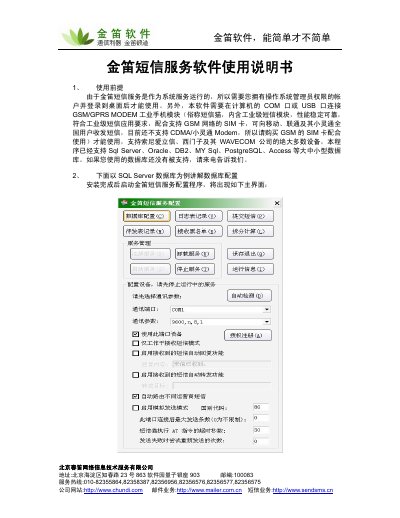
Chundi SMS Service Software User Manual
The Chundi SMS Service Software is a system service that requires administrator privileges to operate. It connects to a GSM/GPRS modem (often called a 'SMS cat') via a COM or USB port to send and receive SMS messages to and from China Mobile, China Unicom, and Xintong users. The software supports various database systems including SQL Server, Oracle, DB2, MySQL, PostgreSQL, and Access. This manual is written in Chinese.
Covers: Usage Prerequisites · Database Configuration · Device Configuration · Service Management · Database Table Structure · Device Testing
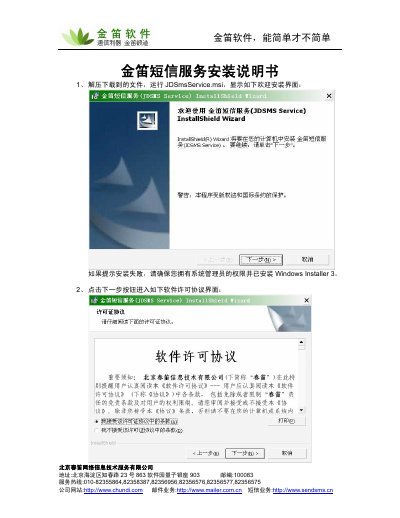
Chundi SMS Service Installation Guide
The document is an installation manual for the Chundi SMS Service (金笛短信服务) developed by Beijing Chun Di Network Information Technology Service Co., Ltd. It details the process of running the installer file JDSmsService.msi, accepting the software license agreement, and configuring the installation path.
Upon successful completion, the guide explains that a 'Chundi SMS' group is created in the Start Menu containing shortcuts for service configuration, device testing, help files, and product descriptions. A desktop shortcut and a system service named JDSMS Service are also added. This manual is written in Chinese.
Covers: Installation Steps · License Agreement · Configuration Path · Post-Installation Features · Authorization Registration · Contact Information

Chundi ME99T GPRS/CDMA IP DTU Modem User Guide
The Chundi ME99T is an integrated GPRS/CDMA IP DTU modem that combines TCP/IP protocol stack technology with wireless network capabilities. It supports transparent transmission modes to replace data radio stations and allows for the establishment of up to 10 simultaneous TCP connections via command instructions.
The device features a compact design (80 x 50.5 x 20 mm) and supports various input voltages, including DC 8-32V or optional DC 5V. It includes RS232 or COMS/TTL level interfaces and offers permanent online mode with automatic reconnection upon disconnection. This manual is written in Chinese.
Covers: ME99T Product Introduction · Hardware Description · Function Test Preparation · AT Command Mode Switching · Serial Port Settings · Baud Rate Configuration
Latest Chundi manuals
Chundi SMS Service Software User Manual
User Manual 5 pages · 395 KB · ZHThis manual explains how to configure the database, connect the GSM/GPRS modem, manage services, and test the Chundi SMS Service Software.
Chundi SMS Service Installation Guide
Installation Guide 2 pages · 218 KB · ZHThis guide provides step-by-step instructions for installing the Chundi SMS service software on Windows, including license agreement acceptance and…
Chundi ME99T GPRS/CDMA IP DTU Modem User Guide
User Manual 22 pages · 1.1 MB · ZHThis user guide covers the operation, configuration, and testing of the Chundi ME99T GPRS/CDMA IP DTU Modem.
Which document do I need?
User Manual
Day-to-day operation, settings and troubleshooting. Start here if the product is already set up.
Installation Guide
Mounting, wiring and first power-up. Read it before the hardware goes in.
Questions answered in Chundi manuals
Which databases does the software support?
The software supports SQL Server, Oracle, DB2, MySQL, PostgreSQL, and Access.
What type of SIM card is required?
You must use a GSM SIM card compatible with China Mobile, China Unicom, or Xintong networks.
What happens if the Chundi SMS service is not authorized?
If authorization registration has not been performed, each connection can only send 88 messages, and random product promotional phrases may be added to sent messages.
What should I do if the installation fails?
Ensure you have system administrator permissions and that Windows Installer 3 is installed.
What is the default baud rate for communication?
The factory default baud rate is set to 9600bps, covering both command mode and transparent mode.
How do I exit the permanent online mode?
To exit the always-on line mode, input three plus signs (+++) to wait for a response before entering commands.