
Key facts
- Manuals
- 6
- Models
- 1
- Languages
- EN
- Last added
- 2023-10-15
BEAM Communications models by category
Featured BEAM Communications manuals
BEAM Communications IntelliDOCK 9555 Installation and User Manual
The BEAM Communications IntelliDOCK 9555 is a low-power docking station designed for the Iridium 9555 handset. It allows the handset to be docked for charging and hands-free speakerphone operation. The system includes a cradle, DC power cable, RAM bracket, and optional accessories like privacy handsets and Bluetooth headsets.
Covers: Package Contents · Safety Information · Installation Guidelines · Connecting Power · Cradle Mounting · Bluetooth Configuration

BEAM Communications PotsDOCK 9555 Installation and User Manual
The BEAM Communications PotsDOCK 9555 is a low-power docking station designed for the Iridium 9555 portable satellite telephone. It allows the handset to be docked for charging and hands-free operation, supporting voice calls, data communications, and optional tracking and alert features. The device is suitable for various vertical markets including maritime, transport, and government applications.
Covers: Safety Information · Package Contents · Installation Guidelines · Cradle Mounting · Iridium Antenna Connection · Preliminary Testing

BEAM IntelliDOCK 9555 Installation and User Manual
The BEAM IntelliDOCK 9555 is a low-power docking station designed for the Iridium 9555 portable satellite telephone. This manual provides instructions for unpacking, installing the cradle in various environments (including vehicles and marine applications), and connecting power via AC or DC sources. It also details optional accessories like the Privacy Handset Kit and Bluetooth Audio Headset.
Covers: Package Contents · Safety Information · Installation Guidelines · Wiring for a Marine Application · Installation Procedure · IntelliDOCK 9555 Usage
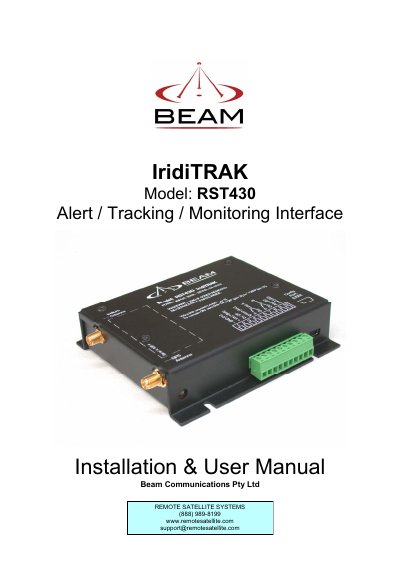
Beam Communications RST430 IridiTRAK Installation and User Manual
The BEAM IridiTRAK is a global alert, tracking, and monitoring system designed for use with the Iridium satellite network. The RST430 model supports applications such as Ships Security Alert Systems (SSAS), Vessel Monitoring Systems (VMS), vehicle/asset monitoring, and wireless duress alarms. It features an in-built GPS engine and operates on a 9-32VDC input.
Covers: Package Contents · Safety Information · Iridium Satellite System · Wiring Connections · Mounting the Unit · Installing the Antenna
Latest BEAM Communications manuals
BEAM Communications IntelliDOCK 9555 Installation and User Manual
User Manual 40 pages · 2 MB · ENThis manual provides installation, operation, and safety instructions for the BEAM Communications IntelliDOCK 9555 docking station for the Iridium 9555…
BEAM Communications PotsDOCK 9555 Installation and User Manual
User Manual 47 pages · 1.6 MB · ENThis manual provides installation, operation, and safety instructions for the BEAM Communications PotsDOCK 9555 docking station for the Iridium 9555…
BEAM IntelliDOCK 9555 Installation and User Manual
User Manual 23 pages · 1.3 MB · ENThis manual covers the installation, operation, and safety guidelines for the BEAM IntelliDOCK 9555 docking cradle for the Iridium 9555 portable satellite…
Beam Communications RST430 IridiTRAK Installation and User Manual
User Manual 45 pages · 763 KB · ENThis manual provides installation, configuration, and operating instructions for the Beam Communications RST430 IridiTRAK satellite tracking and monitoring…
BEAM SatDOCK-G 9555 Installation and User Manual
User Manual 27 pages · 2.4 MB · ENThis manual provides installation, usage, and safety instructions for the BEAM SatDOCK-G 9555 docking station designed for the Iridium 9555 satellite telephone.
BEAM Communications IntelliDOCK 9555 Installation and User Manual
User Manual 44 pages · 2.8 MB · ENInstallation and user guide for the BEAM Communications IntelliDOCK 9555 docking cradle for the Iridium 9555 portable satellite telephone.
Which document do I need?
User Manual
Day-to-day operation, settings and troubleshooting. Start here if the product is already set up.
Questions answered in BEAM Communications manuals
What is the recommended minimum separation between the phone antenna and a pacemaker?
A minimum separation of six inches (6") should be maintained between the wireless phone's antenna and a pacemaker.
From: BEAM Communications IntelliDOCK 9555 Installation and User Manual
Can the IntelliDOCK 9555 be submerged in water?
No, you should not submerge the system in water.
From: BEAM Communications IntelliDOCK 9555 Installation and User Manual
What is included in the PotsDOCK 9555 package?
The package includes the PotsDOCK 9555 Docking Cradle, AC/DC Power Adaptor, DC Power Cable, RAM Bracket, M4 Screw Set, User Manual, and Quick Start Guide.
From: BEAM Communications PotsDOCK 9555 Installation and User Manual
What safety precautions are required for explosive atmospheres?
Turn the phone OFF and do not remove the battery or the handset from the cradle in areas with potentially explosive atmospheres to prevent sparks.
From: BEAM Communications PotsDOCK 9555 Installation and User Manual
What is included in the IntelliDOCK 9555 package?
The package includes the IntelliDOCK 9555 Docking Cradle, a DC power cable, a RAM bracket, M4 screws, the User Manual, and a Quick Start Guide.
Can the IntelliDOCK 9555 be used in potentially explosive atmospheres?
No, you must turn the phone OFF and not remove the handset from the cradle in areas with potentially explosive atmospheres to prevent sparks.