
Key facts
- Manuals
- 1
- Languages
- EN
- Last added
- 2026-10-07
Featured Renogy manuals
Renogy PWM10CC Charge Controller User Manual
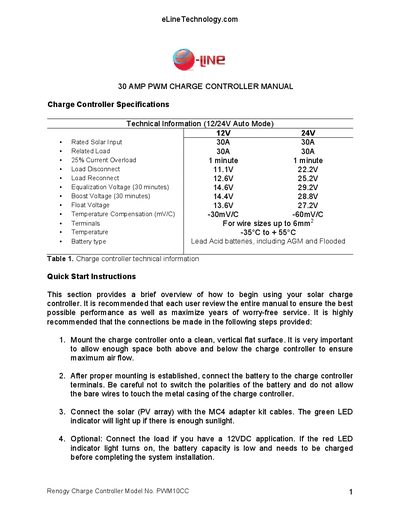
This manual covers the technical specifications of the Renogy PWM10CC 30 A PWM charge controller, including rated solar input, load limits, voltage settings, temperature compensation, and compatible battery types. It also provides a quick‑start guide for mounting, wiring the battery, solar panel, and optional load.
Further sections explain lighting control modes, LED indicator meanings, troubleshooting tips for common LED alerts, and a yearly inspection and maintenance checklist to ensure reliable operation.
Covers: Charge Controller Specifications · Quick Start Instructions · Lighting Control Options · LED Indicator Icon · Troubleshooting · Inspection and Maintenance
Latest Renogy manuals
Renogy PWM10CC Charge Controller User Manual
User Manual 4 pages · 188 KB · ENThe Renogy PWM10CC manual provides specifications, installation steps, lighting control options, LED indicators, troubleshooting, and maintenance guidance.
Which document do I need?
User Manual
Day-to-day operation, settings and troubleshooting. Start here if the product is already set up.
Questions answered in Renogy manuals
What does the green LED indicate during daytime?
The green LED should be ON, showing that solar power is charging the battery.
How do I reset the controller after an overload or short‑circuit?
Press the SET button; the controller will resume operation after about 10 seconds (or up to a few minutes).