
Key facts
- Manuals
- 1
- Languages
- ZH
- Last added
- 2026-11-10
Featured Prokit’s manuals
Prokit's SI-169U 3D Print Finishing Tool User's Manual
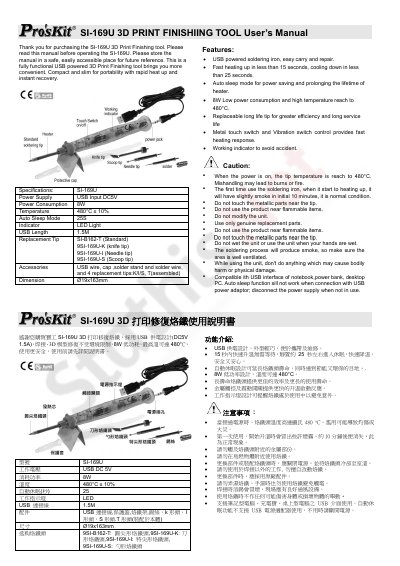
This is the two-page user's manual for the Prokit's SI-169U, a USB-powered 3D print finishing tool that the manual also describes as a USB powered soldering iron. It lists the tool's specifications, including DC 5V USB input, 8W power consumption, a tip temperature of 480°C ± 10%, a 25-second auto sleep mode and a 1.5M USB cable, together with the supplied accessories and the available replacement tips.
The manual explains the main features such as heating up in under 15 seconds, cooling down in under 25 seconds, the auto sleep design for saving power and extending heater life, the metal touch and vibration switch, and the working indicator LED. It then gives safety cautions for use at 480°C, notes that the auto sleep function does not work with a USB power adaptor, and closes with a Chinese warranty card covering a one-year main unit warranty and three-month heating element warranty. This manual is written in Chinese.
Covers: Specifications · Features · Cautions · Accessories · Replacement Tips · Warranty
Latest Prokit’s manuals
Prokit's SI-169U 3D Print Finishing Tool User's Manual
User Manual 2 pages · 811 KB · ZHUser's manual for the Prokit's SI-169U USB-powered 3D print finishing tool, covering specifications, features, cautions, accessories and warranty.
Which document do I need?
User Manual
Day-to-day operation, settings and troubleshooting. Start here if the product is already set up.
Questions answered in Prokit’s manuals
What power supply does the SI-169U use?
It uses a USB power supply with DC 5V input and draws 8W.
From: Prokit's SI-169U 3D Print Finishing Tool User's Manual
How hot does the SI-169U tip get?
The tip temperature reaches 480°C ± 10%.
From: Prokit's SI-169U 3D Print Finishing Tool User's Manual