
Key facts
- Manuals
- 1
- Languages
- EN
- Last added
- 2026-11-05
Featured Lockwood manuals
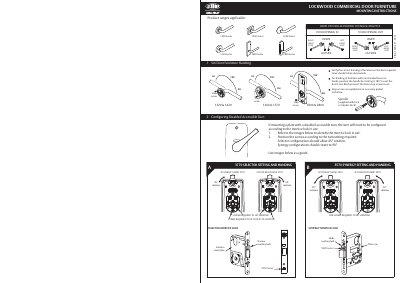
Lockwood 1220-221 - 0321 Commercial Door Furniture Installation Guide
This guide provides step-by-step instructions for installing Lockwood commercial door furniture, including configuring handing for left- or right-hand doors and selecting appropriate tailbars based on door thickness. It details screw settings, door preparation, and mounting plate configurations for models like 1220, 1420, 1360, 1370, 1800, and 2800 series. The guide also includes templates for drilling holes based on backset and lock type.
Covers: Mounting Instructions · Handing Configuration · Tailbar Selection · Door Preparation · Mounting Plate Furniture with Turn Configurations · Final Assembly
Latest Lockwood manuals
Lockwood 1220-221 - 0321 Commercial Door Furniture Installation Guide
Installation Guide 2 pages · 1.7 MB · ENInstallation guide for Lockwood commercial door furniture, covering mounting, handing, and tailbar selection for various door series.
Which document do I need?
Installation Guide
Mounting, wiring and first power-up. Read it before the hardware goes in.
Questions answered in Lockwood manuals
What rotation angle is required for a 3570 selector setting?
The 3570 selector setting requires a 90° rotation.
From: Lockwood 1220-221 - 0321 Commercial Door Furniture Installation Guide
What rotation angle is required for a 3770 selector setting?
The 3770 selector setting requires a 45° rotation.
From: Lockwood 1220-221 - 0321 Commercial Door Furniture Installation Guide