
Key facts
- Manuals
- 1
- Languages
- EN
- Last added
- 2026-11-06
Featured kinetic manuals
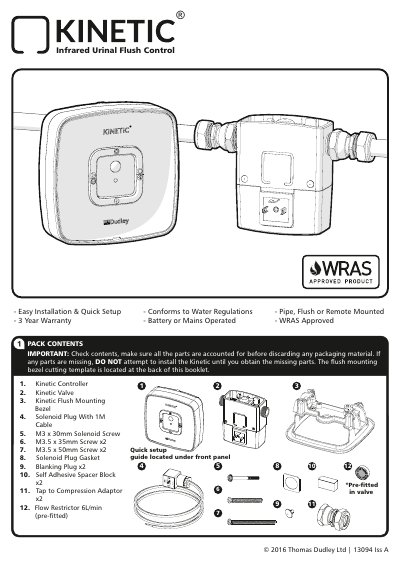
Kinetic Infrared Urinal Flush Control Installation and Setup Guide
This booklet covers the Kinetic infrared urinal flush control, a controller and valve set that monitors washroom traffic and works with a cistern and auto syphon to adjust urinal flushing time. It lists the pack contents and describes three mounting options: pipe mounted (battery only), flush mounted and remote mounted (battery and mains powered).
The guide explains installation requirements, valve fitting, controller wiring for battery and mains operation, and setup, including the hygiene and economy operating modes and the 12- or 24-hour flush when no movement is detected. It conforms to Water Regulations and is WRAS Approved, and is marked © 2016 Thomas Dudley Ltd.
Covers: Pack contents · Introduction and operating modes · Installation requirements · Installing the valve · Kinetic controller pipe mounted (batteries only) · Remote mounted (battery & mains powered)
Latest kinetic manuals
Kinetic Infrared Urinal Flush Control Installation and Setup Guide
Installation Guide 10 pages · 3.3 MB · ENInstallation, wiring and setup guide for the Kinetic infrared urinal flush control, with battery or mains mounting options and hygiene/economy modes.
Which document do I need?
Installation Guide
Mounting, wiring and first power-up. Read it before the hardware goes in.
Questions answered in kinetic manuals
What are the operating modes of the Kinetic urinal flush control?
It has two modes: hygiene mode and economy mode. Hygiene mode flushes after 60 minutes of detected movement and economy mode after 80 minutes, each decreasing by 4 minutes with further movement.
From: Kinetic Infrared Urinal Flush Control Installation and Setup Guide
Can the Kinetic be mains powered?
Yes, in flush mounted and remote mounted installations. A mains powered unit must be installed by a qualified electrician with a 3A fused spur.
From: Kinetic Infrared Urinal Flush Control Installation and Setup Guide