
Key facts
- Manuals
- 1
- Languages
- EN
- Last added
- 2026-11-16
Featured iVisions manuals
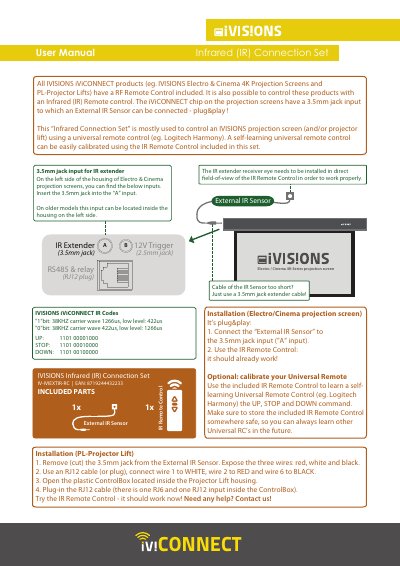
IVISIONS IV-IVIEXTIR-RC Infrared (IR) Connection Set User Manual
The IVISIONS IV-IVIEXTIR-RC Infrared (IR) Connection Set allows users to control iViCONNECT products, such as Electro and Cinema 4K projection screens and PL-Projector Lifts, using an infrared remote control. It is primarily used to enable control via universal remotes like Logitech Harmony through a self-learning calibration process.
The set includes an external IR sensor and an IR remote control. It features a plug-and-play design for projection screens via a 3.5mm jack input and provides specific wiring instructions for integration with PL-Projector Lifts.
Covers: Installation (Electro/Cinema projection screen) · Installation (PL-Projector Lift) · IVISIONS iViCONNECT IR Codes
Latest iVisions manuals
IVISIONS IV-IVIEXTIR-RC Infrared (IR) Connection Set User Manual
User Manual 1 pages · 326 KB · ENUser manual for the IVISIONS IV-IVIEXTIR-RC Infrared Connection Set used to control iViCONNECT projection screens and projector lifts.
Which document do I need?
User Manual
Day-to-day operation, settings and troubleshooting. Start here if the product is already set up.
Questions answered in iVisions manuals
How do I install the IR sensor on Electro or Cinema projection screens?
Connect the External IR Sensor to the 3.5mm jack input (labeled as "A" input) on the left side of the housing.
From: IVISIONS IV-IVIEXTIR-RC Infrared (IR) Connection Set User Manual
What should I do if the IR sensor cable is too short?
You can use a 3.5mm jack extender cable.
From: IVISIONS IV-IVIEXTIR-RC Infrared (IR) Connection Set User Manual