
Key facts
- Manuals
- 1
- Languages
- ES
- Last added
- 2023-11-16
Featured icam manuals
ICAM iPhone Email Account Setup User Manual
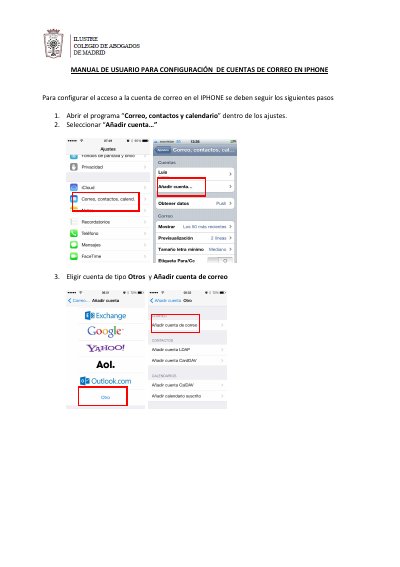
This Spanish-language guide explains how to configure an email account on an iPhone, using an @icam.es address as the example. It walks through opening "Correo, contactos y calendario" in the settings, selecting "Añadir cuenta…", choosing the Otros account type and entering the name, email address and password.
The remaining steps cover the IMAP account type, the incoming and outgoing server data, the verification step and saving the account. The guide then shows how to reopen the account to check the SMTP server settings (port 25, SSL not used) and the Advanced incoming server settings (SSL switched off, port 143). This manual is written in Spanish.
Covers: Correo, contactos y calendario settings · Añadir cuenta · Otros account type · IMAP account · Incoming and outgoing server data · Verification and saving
Latest icam manuals
ICAM iPhone Email Account Setup User Manual
User Manual 5 pages · 1 MB · ESSpanish guide for setting up an @icam.es email account in the iPhone Mail app, covering IMAP, SMTP port 25 and Advanced incoming settings on port 143.
Which document do I need?
User Manual
Day-to-day operation, settings and troubleshooting. Start here if the product is already set up.
Questions answered in icam manuals
What type of email account is used on the iPhone?
The account is set up as an IMAP account, added as an Otros (Other) account in the mail settings.
Which port and SSL setting does the outgoing SMTP server use?
The server port is 25 and SSL is not used.