
Key facts
- Manuals
- 1
- Languages
- ZH
- Last added
- 2023-10-31
Featured High Great manuals
HighGreat Base Station Operation Manual
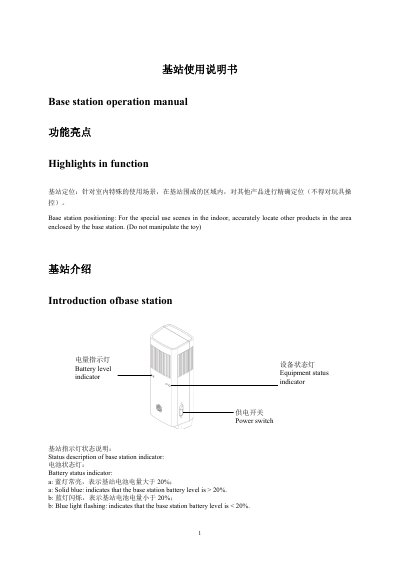
This operation manual, published by Shenzhen HighGreat Innovation Technology Development Co., Ltd., describes a base station used for indoor positioning, where other products are located inside the area enclosed by the base stations. It explains the battery status indicator, the equipment status indicator (which only works on the No.0 main base station), the power switch and the battery level indicator, and it lists what each light color and flashing pattern means.
The manual then covers how a mobile terminal is connected to the base station through a range extender and how the numbered base stations should be arranged clockwise in a rectangle. It also describes charging the battery with the charging base, battery and power adapter, and closes with battery safety warnings, the disclaimer terms and the FCC and 1999/5/EC compliance statement. This manual is written in Chinese.
Covers: Highlights in function · Introduction of base station · Status description of base station indicator · Power switch · Equipment status indicator · How to connect base station
Latest High Great manuals
HighGreat Base Station Operation Manual
User Manual 7 pages · 269 KB · ZHBilingual operation manual for the HighGreat indoor positioning base station: indicator lights, power switch, connection, placement and battery charging.
Which document do I need?
User Manual
Day-to-day operation, settings and troubleshooting. Start here if the product is already set up.
Questions answered in High Great manuals
How is the mobile terminal connected to the base station?
The mobile terminal is connected to the base station by a range extender (wireless connection).
How long should I wait after powering the base station before connecting?
Wait about 1 minute until the base station is stable before connecting; if connection fails, try restarting the main base station.