
Key facts
- Manuals
- 3
- Languages
- EN · ZH
- Last added
- 2023-10-18
Featured E-Plus manuals
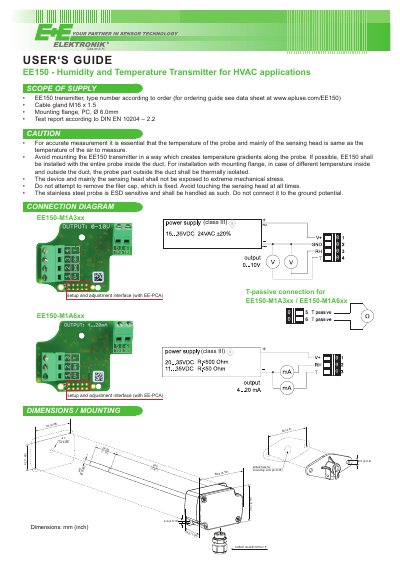
EPlus EE150 Humidity and Temperature Transmitter User Manual
This document provides installation guidelines and technical specifications for the EPlus EE150 humidity and temperature transmitter. It includes mounting recommendations, sensor handling precautions, and electrical connection details. The device is ready for use with factory settings matching the ordered type number, and can be adjusted using optional EE-PCA and EE-PCS tools for output scaling and calibration.
Technical data covers operating and storage conditions, output types (0-10 V or 4-20 mA), power supply options, and environmental protection (IP65/NEMA 4). The sensor is ESD-sensitive and must be handled carefully to avoid damage.
Covers: Installation Guidelines · Technical Specifications · Connection Diagram · Adjustment and Configuration · Electrical Connections · Environmental Ratings
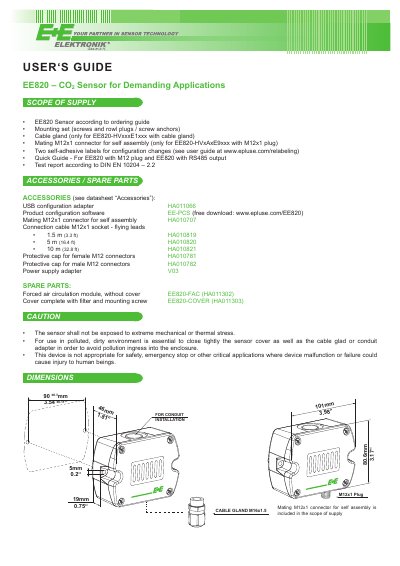
Eplus EE820 CO2 Sensor User Guide
This document serves as the user guide for the Eplus EE820 CO2 sensor, designed for demanding applications. It details the scope of supply, including mounting sets and accessories, and provides critical safety cautions regarding mechanical stress and environmental protection. The guide explains the sensor's dimensions for conduit installation and describes the connection diagrams for both analogue and RS485 output versions.
Covers: Scope of Supply · Accessories and Spare Parts · Dimensions for Conduit Installation · Connection Diagrams · Technical Data · Setup and Adjustment
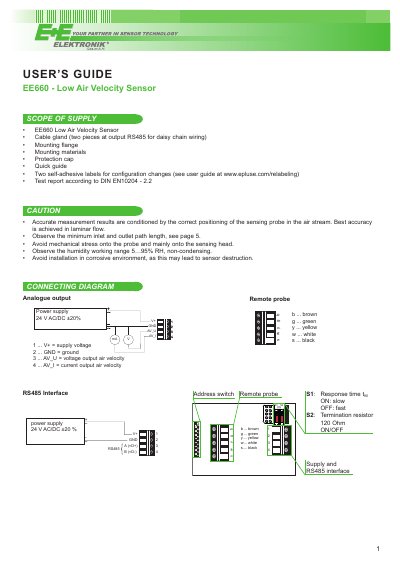
Eplus EE660 Low Air Velocity Sensor User Manual
This manual provides instructions for installing and configuring the Eplus EE660 low air velocity sensor. It includes connection diagrams, analog and digital settings, technical specifications, and maintenance guidelines. The sensor is designed for accurate airflow measurement in laminar flow conditions and requires proper positioning in ventilation ducts. Maintenance is minimal under normal conditions, with cleaning recommended only in polluted environments using isopropyl alcohol. This manual is written in Chinese.
Covers: Scope of Supply · Connecting Diagram · Analog Settings · Digital Settings · Technical Data · Mounting and Positioning
Latest E-Plus manuals
EPlus EE150 Humidity and Temperature Transmitter User Manual
User Manual 2 pages · 730 KB · ENUser manual for EPlus EE150 humidity and temperature transmitter with installation, technical specs, and adjustment instructions.
Eplus EE820 CO2 Sensor User Guide
User Manual 7 pages · 3.1 MB · ENUser guide for the Eplus EE820 CO2 sensor, covering installation, configuration, digital interface setup, and maintenance instructions.
Eplus EE660 Low Air Velocity Sensor User Manual
User Manual 7 pages · 1.5 MB · ZHUser guide for Eplus EE660 low air velocity sensor, covering installation, configuration, technical specs, and maintenance.
Which document do I need?
User Manual
Day-to-day operation, settings and troubleshooting. Start here if the product is already set up.
Questions answered in E-Plus manuals
Does the EE150 require user configuration?
No, the EE150 is ready to use with factory settings matching the ordered type number.
From: EPlus EE150 Humidity and Temperature Transmitter User Manual
How can I adjust the EE150 settings?
Use the optional E+E Product Configuration Adapter (EE-PCA) and software (EE-PCS) to set output scaling and perform calibration.
From: EPlus EE150 Humidity and Temperature Transmitter User Manual
Does the EE820 require user configuration?
The EE820 is ready to use and does not require any configuration by the user, as the factory setup corresponds to the ordered type number.
What is the factory setting for the Modbus slave address?
The factory setting for the Modbus slave address (EE820) is 67.
What is the working range of the EE660 sensor?
The working range is selectable via jumper: 0...1 m/s (0...200 ft/min), 0...1.5 m/s (0...300 ft/min), or 0...2 m/s (0...400 ft/min).
What is the response time of the sensor?
The response time τ90 is typically 4 seconds (slow) or 1 second (fast), selectable via jumper or slide switch.