
Key facts
- Manuals
- 1
- Languages
- EN
- Last added
- 2023-10-15
Featured Breezeline manuals
Breezeline Internet Service User Guide
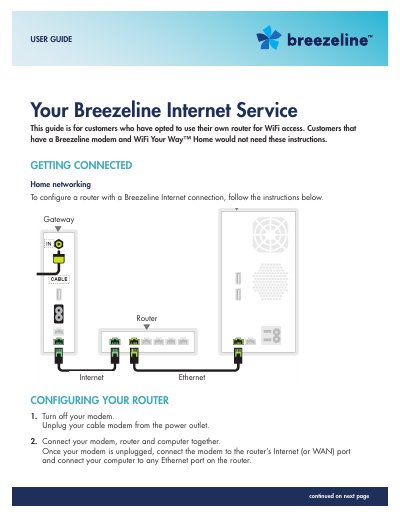
This user guide provides instructions for customers who have opted to use their own router for Breezeline Internet access. It details the steps to configure the router for a broadband connection, including power cycling the modem and router to establish a link with the Breezeline network. The guide also covers setting up the connection for both Internet and TV services.
Covers: Getting Connected · Configuring Your Router · Equipment Setup for Internet · Equipment Setup for Internet and TV · Managing Your Email · Using Breezeline Email
Latest Breezeline manuals
Breezeline Internet Service User Guide
User Manual 5 pages · 342 KB · ENInstructions for configuring a customer-owned router for Breezeline Internet service, connecting devices to the WiFi network, and troubleshooting connection…
Which document do I need?
User Manual
Day-to-day operation, settings and troubleshooting. Start here if the product is already set up.
Questions answered in Breezeline manuals
Do I need this guide if I have a Breezeline modem?
No, customers that have a Breezeline modem and WiFi Your Way™ Home would not need these instructions.
How do I connect my computer to the Breezeline network?
Connect the modem to the router's Internet (or WAN) port and connect your computer to any Ethernet port on the router.