
Key facts
- Brand
- Whirlpool
- Model
- W 75
- Documents
- 3
- Languages
- EN
- Last added
- 2012-04-01
Start here
Whirlpool W75 Dishwasher User Manual
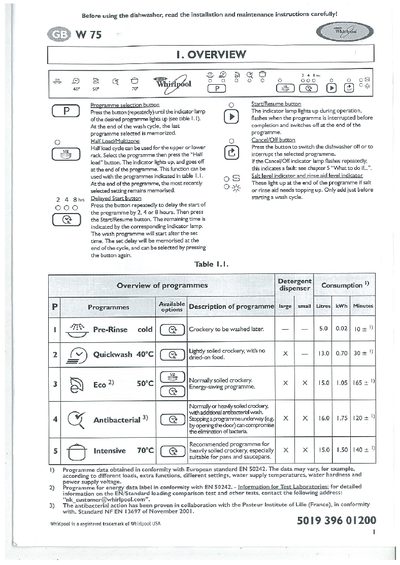
This manual explains how to install, use, and maintain the Whirlpool W75 built‑in dishwasher. It covers the control panel, programme selection, half‑load function, delay start, and the indicators for salt and rinse‑aid levels.
The guide includes a quick reference guide, detailed steps for loading racks, filling detergent, salt and rinse‑aid, safety precautions, energy‑saving tips, and a troubleshooting section that lists fault codes and common problems.
Whirlpool W 75 specifications
| Loading capacity | 12 place settings |
|---|---|
| Ambient operating temperature | 5 °C to 45 °C |
| Maximum water inlet temperature | 60 °C |
All Whirlpool W 75 documents by type
Day-to-day operation, settings and troubleshooting. Start here if the product is already set up.
Questions answered in these manuals
How can I delay the start of a wash cycle?
Press the button repeatedly to set a delay of 2, 4 or 8 hours, then press the Start/Resume button.
What does a flashing Cancel/Off indicator lamp mean?
It indicates a fault; refer to chapter 5 “What to do if…”.
How do I reset a fault on the Whirlpool W 75 dishwasher?
Press the START button for about 2 seconds until the indicator lamp switches off, or press the RESET button if the model has one.
What does the Half Load/Multizone button do?
It allows you to wash only the top or bottom rack, reducing water and energy use; the indicator lights up while the function is active.