
Key facts
- Brand
- Nokia
- Model
- E50
- Category
- Smartphones
- Industry
- Electronics
- Documents
- 2
- Languages
- ZH
- Last added
- 2012-01-05
Start here
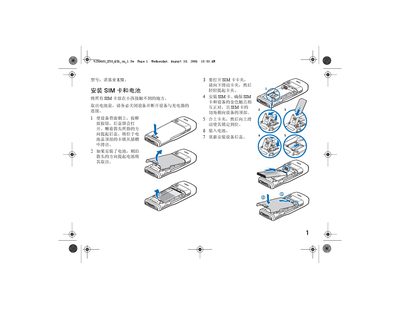
Nokia E50 Quick Start Guide
This guide helps users get started with the Nokia E50 mobile phone. It covers essential steps such as inserting the SIM card, connecting accessories, and navigating the basic menus.
Key sections include SIM installation, headset connection via the Pop‑Port, setting PIN and security codes, adjusting date and time, charging the device, and using data transfer features. The guide also points to online resources for software updates and further assistance. This manual is written in Chinese.
All Nokia E50 documents by type
Day-to-day operation, settings and troubleshooting. Start here if the product is already set up.
The shortest path to a working setup, usually only a few pages.
Questions answered in these manuals
How do I install the SIM card in the Nokia E50?
Remove the back cover, place the SIM card with the gold contacts facing down, and re‑attach the cover as shown in the guide.
How can I connect a headset to the phone?
Use the Pop‑Port connector on the device to attach the headset.
What network bands does the Nokia E50 support?
The Nokia E50 supports EGSM 850, 900, 1800 and 1900 bands.
From: Nokia E50 User Manual
What is the maximum SAR value for the Nokia E50?
The maximum specific absorption rate (SAR) is 0.97 W/kg.
From: Nokia E50 User Manual