
Key facts
- Brand
- Lutron
- Model
- RadioRA 2
- Category
- Other Electronics
- Industry
- Electronics
- Documents
- 3
- Languages
- ZH · EN
- Last added
- 2026-11-23
Start here
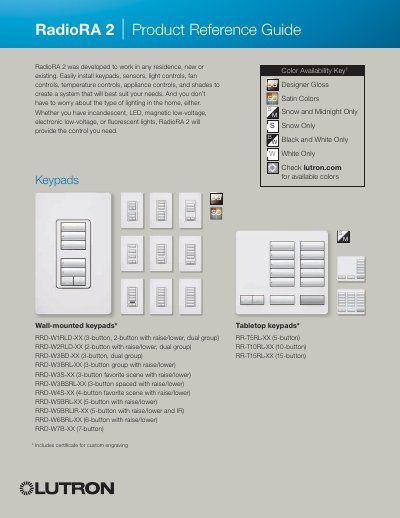
Lutron RadioRA 2 Product Reference Guide
This Lutron RadioRA 2 Product Reference Guide lists model numbers and color options for RadioRA 2 products, including wall-mounted and tabletop keypads, dimmers, switches, and fan controls.
The guide also covers RF modules, Pico wireless controls, sensors, TouchPRO Wireless thermostats, wallplates, accessories, shades, and system components such as repeaters and the Lutron Connect Bridge. This manual is written in Chinese.
Lutron RadioRA 2 specifications
| Dimmer load rating | 150 W LED/CFL, 600 W INC/HAL/MLV |
|---|---|
| Fan control current | 2 A |
| Switch current rating | 8 A |
All Lutron RadioRA 2 documents by type
Mounting, wiring and first power-up. Read it before the hardware goes in.
Questions answered in these manuals
What types of lighting does RadioRA 2 support?
RadioRA 2 works with incandescent, LED, magnetic low-voltage, electronic low-voltage, or fluorescent lights.
What is included with tabletop keypads?
Tabletop keypads include a certificate for custom engraving.
Can a Hybrid Keypad be installed without a neutral wire?
Yes. If no neutral wire is available, tighten the silver terminal without connecting any wires to it.
From: Lutron RadioRA 2 Hybrid Keypads Product Specifications
Which wallplates can be used with Hybrid Keypads?
Only Lutron Designer (Claro or Satin Colors) wallplates, which are sold separately.
From: Lutron RadioRA 2 Hybrid Keypads Product Specifications
How do I find the Lutron IP address for Luxor configuration?
The Lutron IP address can be found on the main repeater, as recorded on page 5.
From: Lutron RadioRA2 Lighting Accessories Luxor® Controller Integration Guide
What username and password are required for the Telnet login?
The required username is hunter and the password is 1234.
From: Lutron RadioRA2 Lighting Accessories Luxor® Controller Integration Guide