
Key facts
- Brand
- i-Key
- Model
- BT-80
- Documents
- 2
- Languages
- EN
- Last added
- 2023-10-19
Start here
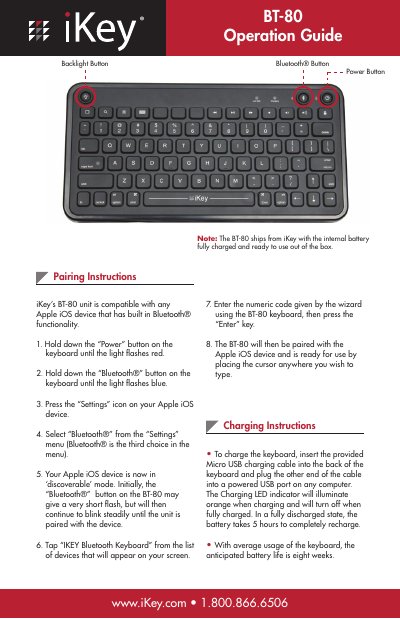
iKey BT-80 Bluetooth Keyboard Operation Guide
The iKey BT-80 is a Bluetooth keyboard designed for use with Apple iOS devices. The document details the pairing process, which involves holding specific buttons on the keyboard until the light flashes blue, and selecting the device on the iOS settings menu. It also explains how to charge the unit using a Micro USB cable and notes that a fully discharged battery takes 5 hours to recharge.
Read onlineiKey BT-80 specifications
| Compatible Devices | Apple iOS devices |
|---|---|
| Charging Time | 5 hours |
| Battery Life | eight weeks |
| Signal Distance | 10 meters (~30 feet) |
All iKey BT-80 documents by type
Day-to-day operation, settings and troubleshooting. Start here if the product is already set up.
Questions answered in these manuals
How long does it take to fully charge the keyboard?
In a fully discharged state, the battery takes 5 hours to completely recharge.
What happens if the keyboard is not used for 10 seconds?
The unit will go into Sleep Mode to save power and can be woken by pressing any key.
How long does it take to fully charge the keyboard?
In a fully discharged state, the battery takes 5 hours to completely recharge.
What happens if the keyboard is not used for 10 seconds?
The unit will go into Sleep Mode to save power. You can wake it by pressing any key, such as the space bar.