
Key facts
- Brand
- CAL
- Model
- EI141
- Industry
- Industrial
- Documents
- 2
- Languages
- EN
- Last added
- 2012-05-03
Start here
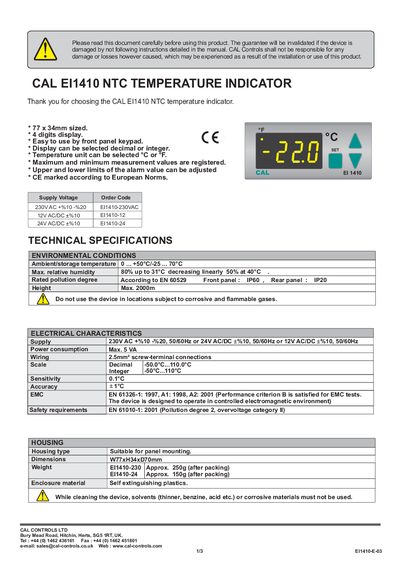
CAL Controls EI1410 NTC Temperature Indicator User Manual
This manual covers the installation and wiring of the EI1410 NTC temperature indicator, including panel mounting, connection diagrams, and safety requirements. It also explains how to use the front‑panel keypad to adjust alarm limits, select display format, and change temperature units.
Technical specifications such as supply voltage options, power consumption, temperature scale, accuracy, sensitivity, dimensions, weight, and environmental limits are listed. Programming functions for setting limits, hysteresis, offset, and display mode are described, along with error messages and troubleshooting guidance.
CAL EI141 specifications
| Power Consumption | Max. 5 VA |
|---|---|
| Display Digits | 4 digits |
| Temperature Scale | Decimal -50.0°C … 110.0°C |
| Accuracy | +1°C |
| Sensitivity | 0.1°C |
| Dimensions | W77 x H34 x D70 mm |
| Weight (230V version) | Approx. 250 g (after packing) |
| Ambient Temperature Range | 0 °C … +50 °C (storage -25 °C … 70 °C) |
| Maximum Relative Humidity | 80 % up to 31 °C |
| IP Rating | Front panel IP60, Rear panel IP20 |
Source: CAL Controls EI1410 NTC Temperature Indicator User Manual
All CAL EI141 documents by type
Day-to-day operation, settings and troubleshooting. Start here if the product is already set up.
Questions answered in these manuals
How can the alarm limits be adjusted?
Use the front‑panel keypad; the upper and lower limits of the alarm value can be adjusted.
From: CAL Controls EI1410 NTC Temperature Indicator User Manual
How do I change the temperature unit display?
Press the programming key and select the desired unit; the temperature unit can be selected °C or °F.
From: CAL Controls EI1410 NTC Temperature Indicator User Manual
What is the maximum power consumption of the indicator?
The device consumes up to 7 VA.