
Key facts
Start here
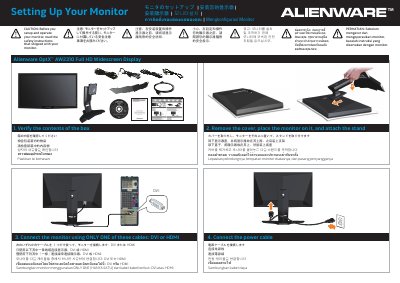
Alienware OptX AW2310 Full HD Widescreen Display Setup Guide
This guide explains how to set up the Alienware OptX AW2310 Full HD widescreen display. It covers verifying the box contents, removing the cover, attaching the stand, connecting the monitor with either a DVI or HDMI cable, connecting the power cable, attaching the cable cover, and turning the monitor on.
The rear-panel diagram identifies the shortcut keys for Preset Modes, Brightness/Contrast, and Input Source, along with the cable cover, USB downstream and upstream ports, DVI-D and HDMI connectors, power control, audio input and output, and Exit Menu control. A note states that 3D display can be experienced on the AW2310 monitor and refers to the User's Guide for system requirements and additional 3D accessories.
Alienware AW2310 specifications
| Screen size | 23 inches (584.2 mm) |
|---|---|
| Optimal resolution | 1920 x 1080 at 60 Hz |
| Pixel pitch | 0.265 mm |
| Contrast ratio | 1000:1 typical |
| Response time | 3 ms typical |
| Colors | 16.7 million |
| Input voltage | 100 to 240 VAC |
| Normal power consumption | 55 W typical / 75 W maximum |
All Alienware AW2310 documents by type
Day-to-day operation, settings and troubleshooting. Start here if the product is already set up.
The shortest path to a working setup, usually only a few pages.
Questions answered in these manuals
What screen size does the Alienware OptX AW2310 have?
It has a 23-inch (584.2 mm) visible display area.
What is the optimal preset resolution?
The optimal preset resolution is 1920 x 1080 at 60 Hz.
Which cable should be used to connect the Alienware OptX AW2310 monitor?
Use only one of the two listed cables: DVI or HDMI.
From: Alienware OptX AW2310 Full HD Widescreen Display Setup Guide
How is the monitor turned on after setup?
Touch the Power control to turn on the monitor.
From: Alienware OptX AW2310 Full HD Widescreen Display Setup Guide
Which cable do I use to connect the Alienware AW2310 monitor?
Connect the monitor using only one of these cables: DVI or HDMI.
From: Alienware OptX AW2310 Full HD Widescreen Display Setup Guide
Can the AW2310 monitor display 3D content?
Yes, you can experience 3D display on the AW2310; system requirements and additional 3D accessories are covered in the User's Guide.
From: Alienware OptX AW2310 Full HD Widescreen Display Setup Guide