
This user manual for the Xiaomi JCY01ZM PM2.5 detector explains how to operate, connect via Wi-Fi, reset settings, and maintain the device.
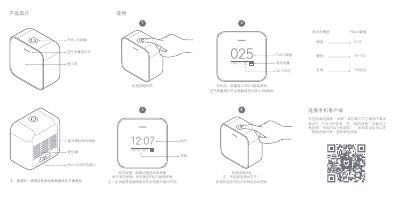
The document provides instructions for operating the Xiaomi JCY01ZM PM2.5 Detector. It details how to turn the device on or off using the switch/key, navigate between the clock interface and the PM2.5 value display, and interpret the air quality indicator lights (Red, Orange, Green) based on specific numerical ranges. This manual is written in Chinese.
| Product Model | JCY01ZM |
|---|---|
| Dimensions | 63 x 34 x 63mm |
| Battery Capacity | 750mAh |
| Wireless Connection | Wi-Fi IEEE 802.11 b/g/n 2.4GHz |
| Rated Input | 5V 1.0A |
Short press the button to toggle between the clock interface and the PM2.5 value interface.
Short press the reset button to reset the Wi-Fi if the phone cannot connect.