
A detailed guide for Xbox players on how to use controller buttons in Assassin's Creed Brotherhood for single‑player and multiplayer modes.
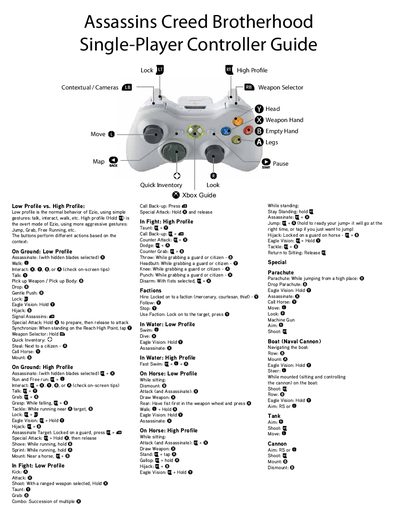
This guide explains the Xbox controller layout for Assassin's Creed Brotherhood, covering both single‑player and multiplayer gameplay. It describes the two control profiles – Low Profile for normal actions and High Profile for more aggressive gestures – and how each button behaves in different contexts.
The document lists button mappings for on‑ground actions, combat, water, horse riding, boat and tank controls, as well as special functions such as Eagle Vision, Assassinate, and Parachute deployment. Players can reference the guide to master combos, quick inventory access, and context‑sensitive moves.
Low Profile uses normal gestures like talk, interact, and walk, while High Profile (activated by holding X) enables aggressive actions such as jump, grab, and free‑running.
Select the hidden blades and press X to execute an Assassinate.
Hold the Y button (or X + Hold Y in High Profile) to activate Eagle Vision.