
Installation checklist for the WM WM-4000 wrapper, covering pre-delivery setup, store installation, and operator training steps.
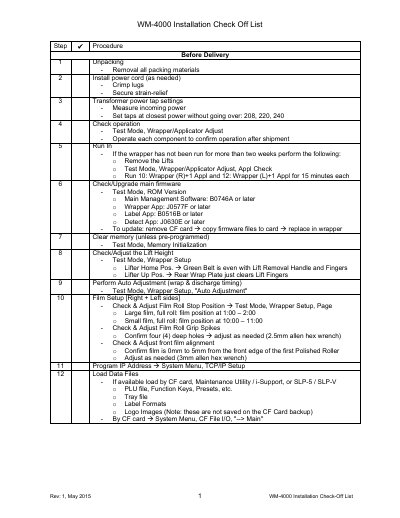
This document is the WM WM-4000 Installation Check Off List, revised in May 2015. It provides a step-by-step checklist for installing and configuring the WM-4000 wrapper before delivery and at the store.
The checklist covers unpacking, power cord and transformer tap settings, operation tests, firmware checks, lift height adjustment, auto adjustment, film setup, IP address programming, data loading, label and camera calibration, discharge pusher profile, tray programming, packing for transport, scale calibration, seal heater temperature, and operator training.
| Transformer power taps | 208, 220, 240 |
|---|---|
| Film position, large full roll | 1:00 – 2:00 |
| Film position, small full roll | 10:00 – 11:00 |
| Film alignment from front edge | 0mm to 5mm |
| Seal heater temperature max | 340F |
| Film width left/right | Left = 50, Right = 35 |
| Main Management Software version | B0746A or later |
Set taps at the closest incoming power without going over: 208, 220, or 240.
The maximum seal heater temperature is 340F.
No, logo images are not saved on the CF Card backup.
Initialize the Camera using Page, 3, Mode, 0, Analog, 0, Cyan, Initial, Exec three times.