
The Winix C545 Air Purifier User Manual provides setup, operation, maintenance, safety instructions, and specifications.
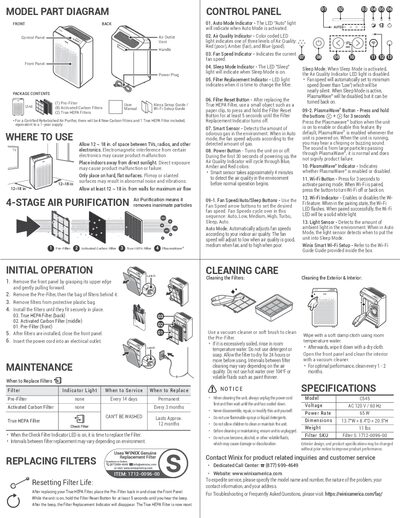
This manual covers everything needed to install and use the Winix C545 air purifier, including front‑package contents, control‑panel functions, Wi‑Fi setup, and filter replacement procedures. It explains the indicator LEDs, Auto and Sleep modes, and the PlasmaWave® feature, as well as how to reset the filter life after changing the True HEPA filter.
Additional sections detail cleaning and maintenance of the pre‑filter, activated carbon and HEPA filters, safety precautions for household use, warranty information, and technical specifications such as voltage, power consumption, dimensions, and weight.
| Model | C545 |
|---|---|
| Voltage | AC 120 V / 60 Hz |
| Power Rate | 65 W |
| Dimensions | 13.7"W × 8.4"D × 20.5"H |
| Weight | 11 lbs |
| Filter SKU | 1712-0096-00 |
While the unit is on, hold the Filter Reset Button for at least 5 seconds until you hear a beep; the Filter Replacement Indicator will turn off.
The LED "Auto" light indicates when Auto Mode is activated, meaning the fan speed adjusts automatically based on air quality.
The True HEPA filter lasts approximately 12 months; the Filter Replacement Indicator LED will turn on when it’s time to change it.
Yes, you can vacuum or gently brush the pre‑filter, and if heavily soiled, rinse it with room‑temperature water, then let it dry for at least 24 hours.