
Instructions for activating and displaying Road Safety Alerts using the Live Navigation service in Vauxhall vehicles.
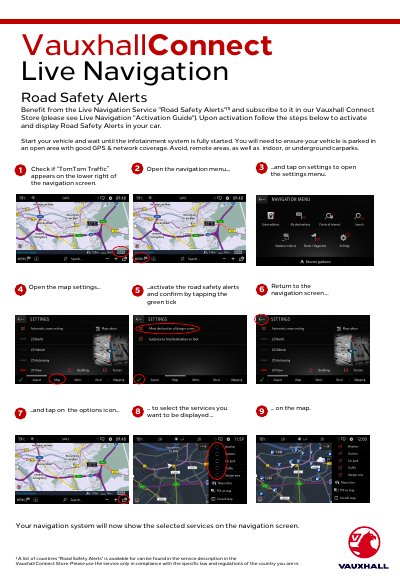
This document provides instructions on how to activate and display Road Safety Alerts using the Live Navigation service in Vauxhall vehicles. Users must subscribe to the service in the Vauxhall Connect Store and ensure the vehicle is parked in an open area with good GPS and network coverage before proceeding.
Start your vehicle and wait until the infotainment system is fully started, then ensure the vehicle is parked in an open area with good GPS and network coverage.
You must ensure your vehicle is parked in an open area with good GPS and network coverage, avoiding remote areas or indoor carparks.