
The V-TONE ADI21 Acoustic Driver DI manual provides setup, control functions, safety instructions, and technical specifications for the guitar effects pedal.
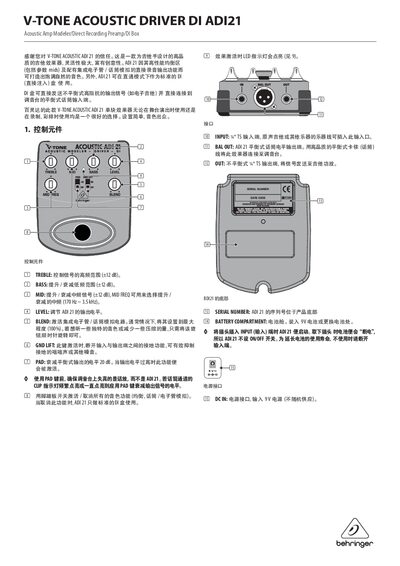
The V-TONE ADI21 Acoustic Driver DI is a high‑quality guitar effects pedal that combines a preamp, equalizer, and built‑in tube/microphone simulation. It can also be used as a standard DI box for direct injection to a mixing console, making it suitable for stage, recording, and rehearsal use.
The manual explains the control elements (Treble, Bass, Mid, Level, Blend, GND LIFT, PAD, footswitch), input and output connections (¼" TS input, balanced XLR output, unbalanced TS output), power options (9 V battery or DC supply), safety precautions, and technical parameters such as impedance and dimensions. This manual is written in Chinese.
| Input impedance | 4.7 MΩ |
|---|---|
| Output impedance (unbalanced) | 1 kΩ |
| Balanced output impedance | 200 Ω |
| Power supply | 9 V >50 mA DC |
| Battery type | 9 V type 6LR61 |
| Power consumption | <100 mA |
| Weight | 0.46 kg |
The unit powers on automatically when a plug is inserted into the INPUT jack and powers off when the plug is removed; there is no separate ON/OFF switch.
When activated, GND LIFT disconnects the ground connection between input and output to reduce hum and other noise.
Use the PAD key to attenuate the balanced output by 20 dB when the signal level is excessive.