
User manual for the Ureika GPS Development Kit covering hardware connections, power options, software tools and data output for GSU-14/15/18/25 modules.
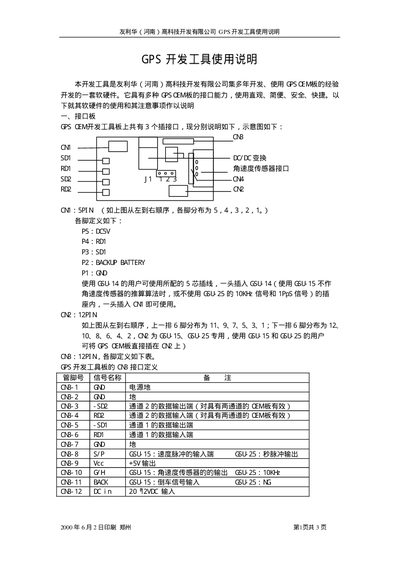
This manual provides detailed instructions for using the Ureika GPS Development Kit, including hardware wiring, pin assignments, and power supply requirements for the GSU‑14, GSU‑15, GSU‑18 and GSU‑25 modules. It also describes the software utilities (AV40.EXE, GPS.EXE, etc.) used to configure the modules and retrieve NMEA‑0183 data.
The document includes troubleshooting tips, debugging procedures, and configuration steps for setting baud rates, voltage levels, and backup battery connections. It is intended for developers integrating the GPS OEM modules into their products. This manual is written in Chinese.
| Backup Battery Pin | P2 |
|---|---|
| Primary Power Supply (Pin P5) | 5 V DC |
| Input Voltage Range | 12 V–20 V DC |
| Default Baud Rate | 9600 bps |
| Data Protocol | NMEA‑0183 |
The modules use a default baud rate of 9600 bps.
Run the AV40.EXE or GPS.EXE utility, which outputs NMEA‑0183 data for the GSU‑14.
Pin P2 is designated for the backup battery.