
UCL guide for connecting Apple iPhone, iPad and iPod touch to the eduroam wireless network, covering credentials, certificate trust and troubleshooting.
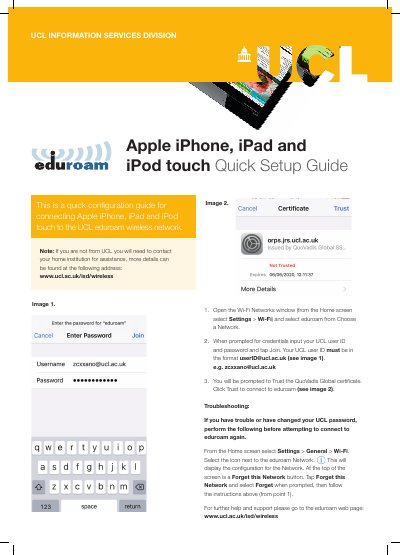
This one-page quick setup guide from UCL Information Services Division explains how to connect an Apple iPhone, iPad or iPod touch to the UCL eduroam wireless network. It covers selecting eduroam, entering UCL credentials and trusting the QuoVadis Global certificate.
The guide also includes troubleshooting steps for connection problems or after a UCL password change, including forgetting the eduroam network and reconnecting. It notes that users not from UCL should contact their home institution for assistance.
The UCL user ID must be entered in the format [email protected], for example [email protected].
You will be prompted to trust the QuoVadis Global certificate; tap Trust to connect to eduroam.
Go to Settings > General > Wi-Fi, select the icon next to the eduroam network, and tap Forget this Network.
Contact your home institution for assistance; more details are at www.ucl.ac.uk/isd/wireless.