
u-blox EVK-EMMY-W1 Evaluation Kit Quick Start Guide

This quick start guide covers installing Linux drivers, connecting the SDIO adapter, checking jumper settings, and powering the u-blox EVK-EMMY-W1…
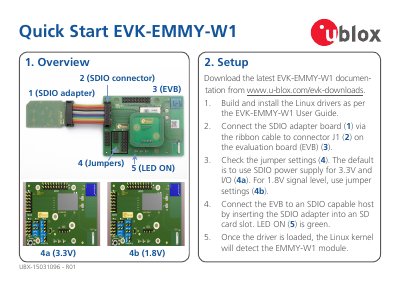

u-blox EVK-EMMY-W1 Evaluation Kit Quick Start Guide - cover page
Brand
Ublox
Category
Other Electronics
Document type
Quick Start Guide
Language
English
Pages
2
File format
PDF
File size
289 KB
Published
02 November, 2026
Updated
02 November, 2026
MD5 checksum
150DC095161B649181163E4AA4F2ECE0

About this manual

This document provides instructions for setting up the u-blox EVK-EMMY-W1 evaluation kit. It details the process of building and installing Linux drivers, connecting the SDIO adapter board via a ribbon cable to connector J1, and verifying jumper settings for 3.3V or 1.8V signal levels. The guide also notes that the LED should be green once the driver is loaded and the Linux kernel detects the module.

What's inside

  • Setup
  • Interfaces
  • Linux drivers
  • Software
  • More information

Frequently asked questions

What does the EVK-EMMY-W1 provide for communication?

It provides an SDIO connector for Wi-Fi, Bluetooth and NFC communication.

What type of antenna is included for Wi-Fi and Bluetooth on the EVK-EMMY-W161?

A dual band 2.4/5 GHz chip antenna is mounted on the board.

Download PDF (289 KB)

More Ublox Manuals


View all Ublox manuals →