
Quick installation and setup guide for the TP-LINK TL-WR840N 300Mbps Wireless N Router, including hardware connection, web configuration, and troubleshooting.
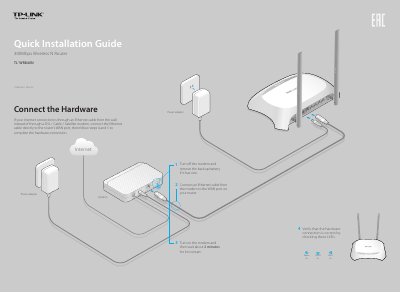
This document provides a quick installation guide for the TP-LINK TL-WR840N 300Mbps Wireless N Router. It details the hardware connection steps, including connecting the modem and power adapter, and verifying the status LEDs. The guide also covers the initial configuration process via a web browser or CD Setup Wizard.
Change the computer's IP settings to obtain an IP address automatically, verify the URL, try a different browser, reboot the router, or disable and re-enable the network adapter.
Check if the Internet works by connecting directly to the modem, reboot the router (and modem for cable users), or clone the MAC address in the Web Management page.
Press and hold the WPS/RESET button on the rear panel for approximately 8 seconds while the router is powered on.
Check the product label if the default password was not changed, or log in to the Web Management page to reset it under Wireless > Wireless Security.