
Quick installation guide for the TP-Link TL-WPA8631P Powerline Extender, covering setup, network pairing, and troubleshooting.
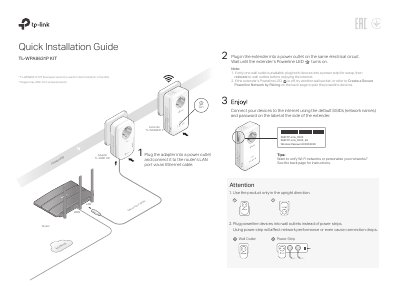
This document serves as a Quick Installation Guide (QIG) for the TP-Link TL-WPA8631P Powerline Extender. It provides step-by-step instructions for physical setup, including connecting the device to a power outlet and a router via Ethernet. The guide details how to connect devices to the default Wi-Fi network and explains the importance of using wall outlets over power strips for optimal performance.
The guide further covers network management features, such as creating a unified Wi-Fi network using OneMesh or copying settings via the Wi-Fi button. It includes specific instructions for pairing multiple powerline devices and troubleshooting common issues like lack of internet connection or failed reconnection after relocation.
Press and hold the Reset button until all LEDs turn off. When the LEDs turn back on, the reset process is complete.
Ensure all devices are on the same electrical circuit, check that Powerline LEDs are lit, and verify the internet connection by connecting directly to the modem.
Ensure all devices are on the same electrical circuit, try to pair the extender again, and check for interference from household appliances.