
User guide for TP-LINK TL-WA5110G access point with setup instructions, wireless modes, and troubleshooting.
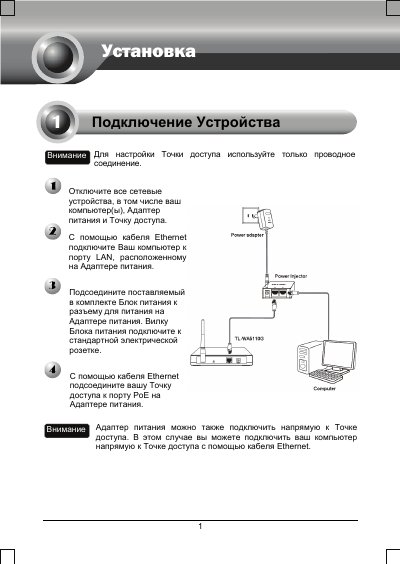
This manual provides step-by-step instructions for setting up the TP-LINK TL-WA5110G access point. It covers connecting via Ethernet, configuring wireless modes (AP Client Router, AP Router, AP), point-to-point connections, and repeater setup. Troubleshooting sections address common issues like login failures and IP conflicts.
The guide includes detailed steps for configuring static IP addresses, setting SSIDs, and resetting the device. It also provides browser setup instructions for Windows XP, Vista, and IE, along with contact information for technical support. This manual is written in Russian.
The default username is admin and the default password is admin.
Enter 192.168.1.254 in the browser address bar to access the management page.
Check the correct connection of wires to the device (power adapter and Ethernet cable).