
This manual explains how to pair, calibrate, operate, charge, and upgrade the Tong Xiaodian Education Edition robot and its control pen.
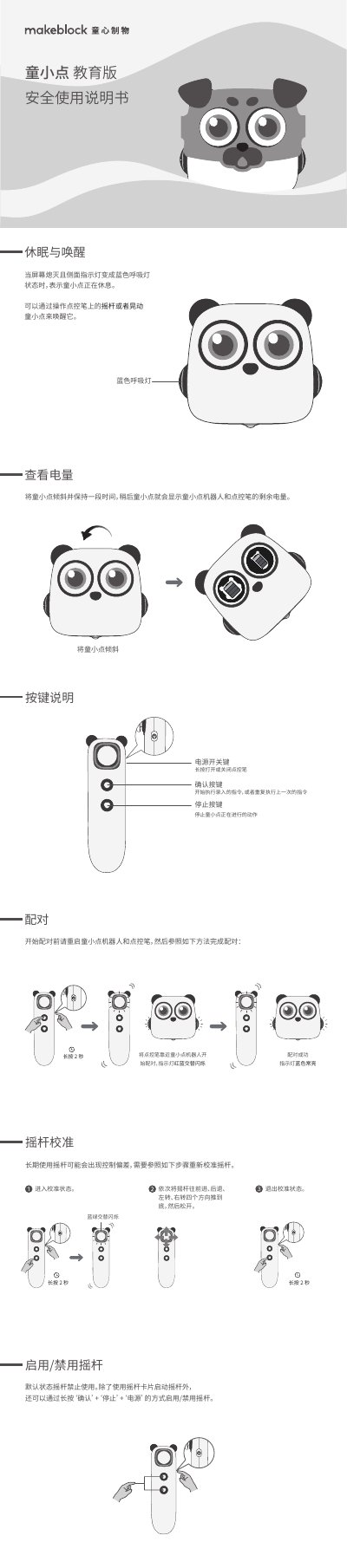
The guide details the pairing process between the robot and the control pen, joystick calibration steps, sleep and wake functions, battery level checking, and button functions. It also provides safety instructions, environmental limits, and a list of hazardous material contents.
Additional sections cover the robot's technical specifications, wireless transmission details, firmware upgrade procedure, and status indicator light meanings, ensuring users can maintain and update the device correctly. This manual is written in Chinese.
| Robot battery capacity | 1800 mAh Li-ion |
|---|---|
| Pen battery capacity | 300 mAh Li-ion |
| Robot input voltage | DC 5 V |
| Robot input current | 1.5 A |
| Pen input voltage | DC 5 V |
| Pen input current | 270 mA |
| Wireless transmission method | 2.4 GHz |
| Frequency band | 2400 MHz – 2480 MHz |
| Effective range | 10 m |
| Operating temperature | 0 °C – 40 °C |
| Storage temperature | -10 °C – 55 °C |
Restart both the robot and the pen, bring the pen close to the robot; the indicator lights will flash red‑blue alternately and then stay blue steady when pairing succeeds.
Enter calibration mode, then push the joystick fully forward, backward, left and right in sequence before releasing.
Tilt the robot and hold it for a moment; the remaining battery levels of both the robot and the pen will be displayed.
Connect the robot to a computer with the USB cable, copy the “update” folder to the robot’s root directory, ensure the battery is above 50 % and restart; the upgrade takes about 3‑5 minutes.