
User guide for the Tempo DigAlert 350/340 loud speaker test telephone: talk and monitor modes, dialling, memory, battery and warranty.
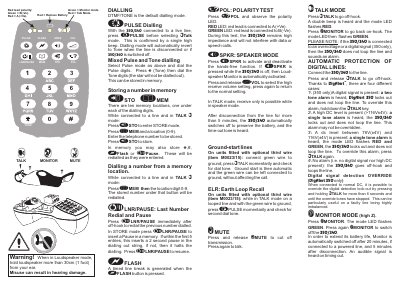
This is the user guide (part n° 1201-03-3081, issue 3, 09/06) for the DigAlert 350™ loud speaker test telephone, ADSL compatible, published by Tempo Europe Ltd. It explains the front-panel keys, talk and monitor modes, the polarity test, speaker and mute functions, and the automatic protection feature that locks the unit out when a digital signal or a high DC level is present on the line.
The guide also covers pulse and tone dialling, storing numbers in the ten memory locations, last number redial and pause, and the flash key. Later pages describe the low battery warning, installing or replacing the 9V alkaline battery, field repair limits, line-cord changing and storage, impact handling, and the Tempo Europe Ltd. warranty terms and contact details.
| Battery type | 9V alkaline |
|---|---|
| Memory locations | 10 |
| Monitor mode auto-off (powered line) | 20 minutes |
| Monitor mode auto-off (after disconnection) | 5 minutes |
| Line compatibility | ADSL compatible |
| Default dialling mode | DTMF/TONE |
| High DC alarm level | >116V ±4V |
| Loudspeaker listening distance | More than 30cm (1 foot) from the ear |
It uses a 9V alkaline battery, fitted by removing the three hatch cover screws and unclipping the old battery.
There are ten memory locations, one under each of the dialling digits 0-9.
Monitor is switched off automatically after 20 minutes if connected to a powered line, and 5 minutes after disconnection, with an audible signal on timing out.
A red LED at the centre of the keypad starts to flash, and a low battery tone is heard at each mode change of the unit.