
Quick setup guide for tekmarNet®2 530Q 530 12/11 thermostat with wiring, switch settings, and operation instructions.
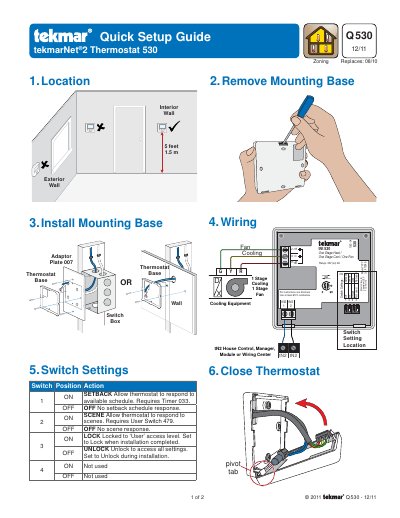
This guide provides step-by-step instructions for installing and configuring the tekmarNet®2 530Q 530 12/11 thermostat. It covers mounting, wiring, switch settings, and basic operation for single-stage heating, cooling, and fan systems. Critical settings like temperature units, fan mode, and heating terminal type are explained for proper system integration.
The guide also references the full Installation and Operation Manual (D530) for detailed settings and includes important notes on access levels for installer mode during setup.
| Temperature Units | °F or °C |
|---|---|
| Fan Mode | Manual, Cooling Only, Heating & Cooling, Heating Only |
| Heating Terminal Type | Hydronic or Other |
| Heat Supply Pump | On or Off |
Press the or button to switch between °F and °C. Default is °F.
Fan modes include Manual, Cooling Only, Heating & Cooling, and Heating Only.
Set switch setting #3 and tekmarNet® system control to Unlock to change access level to Installer. Return to Lock after installation.