
This guide explains how to upgrade the mainboard MCU and USB firmware for Tai Teng Jie Dai lift‑type and impact‑type ink cartridge machines.
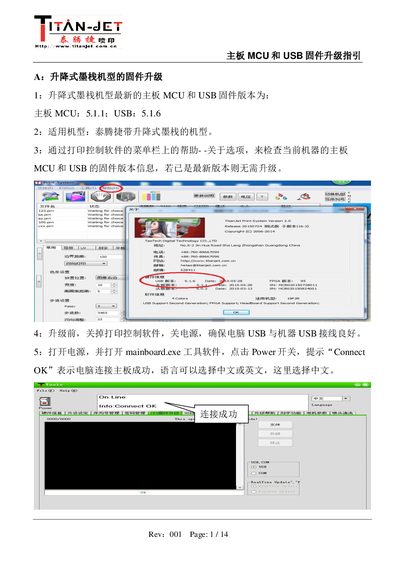
The document provides step‑by‑step instructions for upgrading the mainboard MCU and USB firmware on Tai Teng Jie Dai's lift‑type and impact‑type ink cartridge machines. It lists the latest firmware versions, the applicable models, and how to verify the current version via the printing control software.
Before upgrading, users must close the printing control software, power off the machine, and ensure a good USB connection. Using the provided mainboard.exe tool, the guide walks through selecting the appropriate firmware file, performing the MCU upgrade, then the USB upgrade, and finally confirming success by checking the displayed version and success messages. This manual is written in Chinese.
| Latest Mainboard MCU Firmware (Lift‑type) | 5.1.1 |
|---|---|
| Latest USB Firmware (Lift‑type) | 5.1.6 |
| Latest Mainboard MCU Firmware (Impact‑type) | 1.2.9 |
| Latest USB Firmware (Impact‑type) | 1.3.6 |
Open the printing control software and select Help → About to view the current mainboard MCU and USB firmware versions.
Close the printing control software, turn off the power, and ensure the computer USB cable is securely connected to the machine.
The tool displays “Update Firmware Success!” or “Update Finish!” and the hardware information shows the latest firmware version.
Yes, remove the USB protection jumper before starting the USB firmware upgrade.