
Subaru STARLINK Multimedia System Software Update Guide

This Subaru guide explains how to update STARLINK multimedia software and navigation maps using Wi-Fi, USB drive, or the STARLINK app.
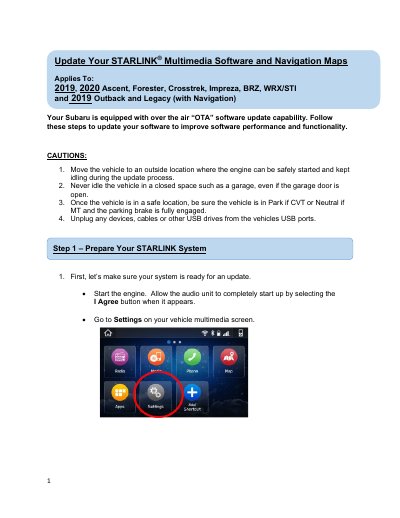

Subaru STARLINK Multimedia System Software Update Guide - cover page
Brand
Subaru
Category
Automotive supplies
Document type
User Manual
Language
English
Pages
22
File format
PDF
File size
2.1 MB
Published
23 November, 2026
Updated
23 November, 2026
MD5 checksum
E12B62EDD36A5552BAF746D79DF68E2D

About this manual

This document provides step-by-step instructions for updating Subaru STARLINK multimedia system software and navigation maps using over-the-air (OTA) capability. It applies to 2019 and 2020 Ascent, Forester, Crosstrek, Impreza, BRZ, WRX/STI and 2019 Outback and Legacy vehicles with navigation.

Three update methods are covered: Option 1 via Wi-Fi for software only, Option 2 via USB drive for software and maps together, and map updates using the STARLINK app. Safety precautions include parking outside with the engine idling and the parking brake engaged.

What's inside

  • Step 1 – Prepare Your STARLINK System
  • Choose Your Update Method
  • Option 1 - Wi-Fi Connection Method
  • Step 2 – Download and Install Updates
  • Option 2 – Map and Software Update via USB Drive
  • Updating Navigation Maps Using the STARLINK App
  • Downloading Maps – Outside Vehicle
  • Update Maps In Vehicle

Frequently asked questions

What does Option 1 update?

It updates the multimedia system software but not the on-board TomTom navigation maps.

What does Option 2 update together?

It updates the multimedia system software and the TomTom navigation maps at the same time.

What size USB drive is needed for Option 2?

A USB 2.0 or 3.0 drive at least 16GB in size.

How much data does the Wi-Fi update use?

At least 100MB.

Download PDF (2.1 MB)

More Subaru Manuals


View all Subaru manuals →