
Troubleshooting guide for Set-Top Box signal, connection, smart card, and power issues.
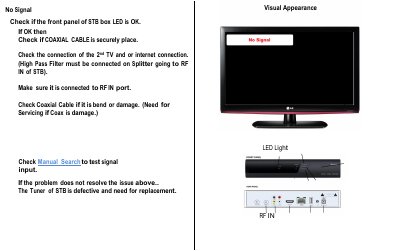
This manual provides step-by-step instructions for resolving common issues with the STB Box, including no signal, no video, no power, and smart card problems. It covers manual and auto search procedures, frequency settings, power supply checks, and smart card insertion and troubleshooting. The guide also includes visual appearance checks and LED light diagnostics for hardware verification.
The manual is structured around remote control commands and physical checks, with specific steps for each issue. It advises users to unplug and replug power, clean smart cards, verify cable connections, and check LED indicators. If problems persist, it recommends servicing or replacing components like the tuner or coaxial cable.
Check if the front panel LED is OK, ensure the coaxial cable is securely placed, verify connections to the TV or internet, and confirm the high pass filter is connected on the splitter going to the RF IN port of the STB. If the issue persists, the tuner may be defective and needs replacement.
Press Menu on the remote, go to Settings icon – Frequency set, press OK, then press 8 5 2 2 to enable NIT frequency, set it to 591, and press OK to save.
Get the smart card number and call the contact center to activate the account. If the issue persists, check the coaxial cable connection and condition, and unplug and replug the power supply for 10 seconds.
Press the AUDIO button on the remote control to toggle between L audio, R audio, Both, and Loud. The sound icon on the multi audio display will change accordingly.