
This manual provides instructions for installing third-party apps, using the SONY client, adjusting font size, restoring system settings, calibrating the…
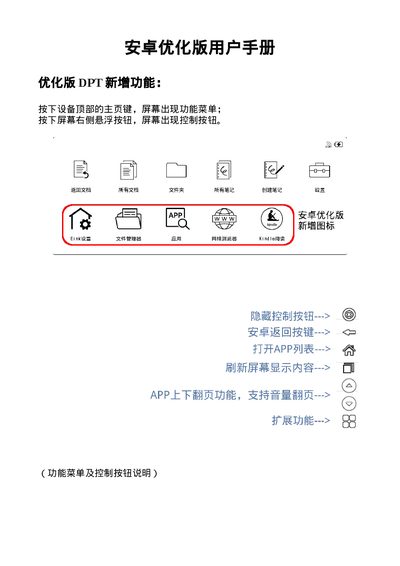
This document is the user manual for the Sony DPT-RP1 Android Optimized ePaper device. It outlines specific features added to the optimized version, such as the function menu accessed via the home key and control buttons accessed via the floating button on the screen.
The guide details procedures for installing and using third-party software via USB storage or OTG, transferring documents using the SONY client, adjusting system font sizes, restoring system settings to initial states, calibrating the stylus, and notes regarding firmware updates. This manual is written in Chinese.
Connect the device to a computer, copy the APP to USB storage, and then select Internal Storage -> USB Storage. File Transfer to install the app.
No, if using the system's built-in PDF reader, you must use the computer client to transfer PDF documents; copying via USB is not supported.