
User manual for Solar KLD1210–KLD4830 solar charge controllers, covering safety, features, LCD menu, wiring, settings, troubleshooting, and specifications.
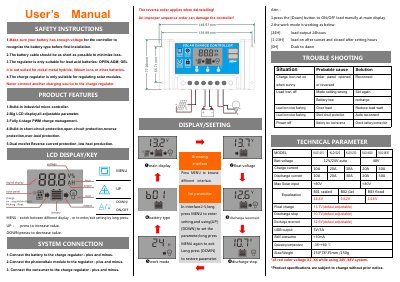
This user manual covers the Solar KLD1210, KLD1220, KLD1230, KLD4820, and KLD4830 solar charge controllers. It explains safety instructions, product features, the LCD display and MENU, UP, and DOWN keys, system connection order, display and setting interfaces, work modes, and troubleshooting.
Technical parameters list battery voltage options, charge and discharge currents, maximum solar input voltage, charge and discharge voltage settings, USB output, self-consumption, operating temperature, and size and weight.
| Models | KLD1210, KLD1220, KLD1230, KLD4820, KLD4830 |
|---|---|
| Battery voltage | 12V/24V auto, 48V |
| Charge current | 10A, 20A, 30A, 20A, 30A |
| Discharge current | 10A, 20A, 30A, 20A, 30A |
| Maximum solar input | <50 V, <80 V |
| Equalization | B01 sealed, B02 Gel, B03 flood |
| Float charge | 13.7 V (default, adjustable) |
| Discharge stop | 10.7 V (default, adjustable) |
| Discharge reconnect | 12.6 V (default, adjustable) |
| USB output | 5V/3A |
| Self-consumption | <10mA |
| Operating temperature | -35 to +60 °C |
| Size | 150 x 78 x 35 mm |
| Weight | 150 g |
| Charge management | Fully 4-stage PWM |
| Battery types | Lead acid batteries: OPEN, AGM, GEL |
The regulator is suitable for lead acid batteries: OPEN, AGM, and GEL. It is not suited for nickel metal hydride, lithium ion, or other batteries.
Connect the battery, photovoltaic module, and consumer to the charge regulator, observing the plus and minus terminals. The reverse order applies when deinstalling, and an improper sequence can damage the controller.
In interfaces 2-5, long press MENU to enter setting, use UP and DOWN to set the parameter, and long press MENU again to exit. Long press DOWN to restore the parameter.
The 24H mode keeps the load output on for 24 hours, the 1-23H mode turns the load on after sunset and off after the set hours, and the 0H mode operates from dusk to dawn.