
Sinotectronics STA Controller (XTA for Domestic Market) datasheet provides power, interface, temperature, touch and pin specifications.
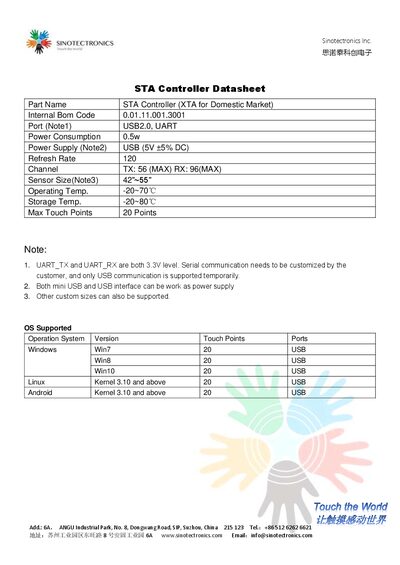
The STA Controller (XTA for Domestic Market) datasheet lists key technical parameters such as power consumption, supply voltage, refresh rate, channel counts, sensor size, operating and storage temperature ranges, and maximum touch points. It also details supported operating systems and USB/UART communication options.
Pin definitions for the controller are provided, showing power, ground, UART and USB signals, as well as reserved and empty pins. The document includes a drawing of the controller layout for reference. This manual is written in Chinese.
| Power Consumption | 0.5 W |
|---|---|
| Power Supply Voltage | 5 V ±5 % DC (USB) |
| Refresh Rate | 120 Hz |
| Channel TX (max) | 56 |
| Channel RX (max) | 96 |
| Sensor Size | 42"–55" |
| Operating Temperature | -20 °C to 70 °C |
| Storage Temperature | -20 °C to 80 °C |
| Maximum Touch Points | 20 |
| Supported OS (Windows Win7) | 20 USB |
| VCC Pin Voltage | 3.3 V |
The controller consumes 0.5 W of power.
It supports up to 20 simultaneous touch points.
The operating temperature range is –20 °C to 70 °C.
Both mini USB and standard USB interfaces can provide power.