
Quick guide for the Sennheiser TC ISP TeamConnect Intelligent Speaker: USB link to Microsoft Teams Rooms, LED states, auto-on, standby and factory reset.
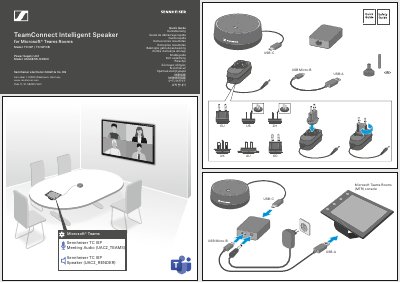
This two-page quick guide covers the Sennheiser TeamConnect Intelligent Speaker (models TC ISP and TC ISP DB) for Microsoft Teams Rooms. It shows the USB-A, USB-C and USB Micro-B connections to a Microsoft Teams Rooms (MTR) console and the device names the speaker uses in Microsoft Teams: "Sennheiser TC ISP Meeting Audio (UAC2_TEAMS)" and "Sennheiser TC ISP Speaker (UAC2_RENDER)". The power supply unit model is listed as ASSA67W-120200.
The guide also illustrates the LED states (off, green, red), auto-on and standby behavior, factory reset, and Cortana voice activation with "Hey Cortana" and a meeting-join phrase. An optional Sennheiser Security Cable Lock is mentioned, along with a 10 – 12 mm opening.
| Speaker model | TC ISP / TC ISP DB |
|---|---|
| Power supply unit model | ASSA67W-120200 |
| Green LED on | < 3.5 m |
| Standby condition | > 10 min |
| Security cable lock opening | 10 – 12 mm |
| Voice activation | "Hey Cortana" ON |
The guide shows USB-A, USB-C and USB Micro-B connections between the speaker and a Microsoft Teams Rooms (MTR) console.
It appears as "Sennheiser TC ISP Meeting Audio (UAC2_TEAMS)" and "Sennheiser TC ISP Speaker (UAC2_RENDER)".
It shows LED off, LED green and LED red states, with the green LED marked "ON < 3.5 m".
Yes, the guide shows Cortana with "Hey Cortana" ON and an example command to join a meeting.