
Seagull #IR camera trigger manual: transmitter channel setup, receiver and flight controller connection, Mission Planner configuration and LED troubleshooting.
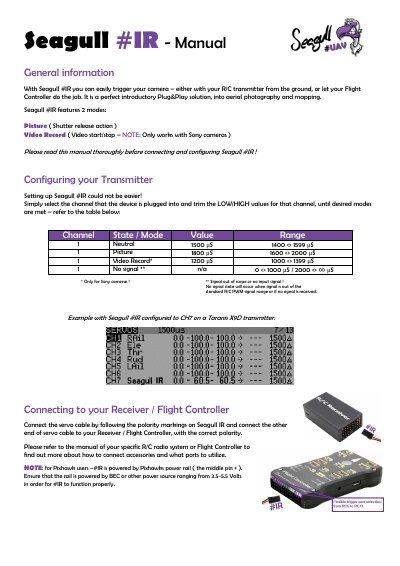
Seagull #IR is a small trigger module that releases a camera shutter or starts and stops video recording. It can be triggered from the ground with an R/C transmitter or by a flight controller; the video record mode works only with Sony cameras.
The manual explains how to set the transmitter channel values for the Neutral, Picture and Video states, how to connect the servo cable to a receiver or flight controller with the correct polarity, and how to configure shutter triggering in Mission Planner. It also lists the LED indications used for troubleshooting and gives the module's dimensions, weight, voltage, current and input signal specifications.
| Dimensions | 23.5 mm x 9.8 mm x 4.4 mm |
|---|---|
| Weight | 1 g (~4 g with servo cable) |
| Voltage | 3.5 – 5.5 volts (5 volts recommended, do not exceed 5.5 volts) |
| Current | 22.5 mA max |
| Input signal | Standard R/C PWM between 1000 – 2000 μS |
Select the channel the device is plugged into and trim the LOW/HIGH values for that channel until the desired modes are met; Picture mode uses 1800 μS.
It operates from 3.5 to 5.5 volts, with 5 volts recommended, and must not exceed 5.5 volts.
The video record mode only works with Sony cameras.
A blinking LED means there is no signal; check the connections and mode values.