
SAKO SUNSEE/SUNON/SUNON PLUS/SUNPOLO Inverter Troubleshooting Guide

Troubleshooting guide for SAKO SUNSEE, SUNON, SUNON PLUS and SUNPOLO inverters with error code 01 fan problems.

SAKO SUNSEE/SUNON/SUNON PLUS/SUNPOLO Inverter Troubleshooting Guide - cover page
Brand
Sako
Category
inverter
Document type
Other
Language
English
Pages
1
File format
PDF
File size
365 KB
Published
23 November, 2026
Updated
23 November, 2026
MD5 checksum
E1E6936A9494584ABA11855D5B92D93A

About this manual

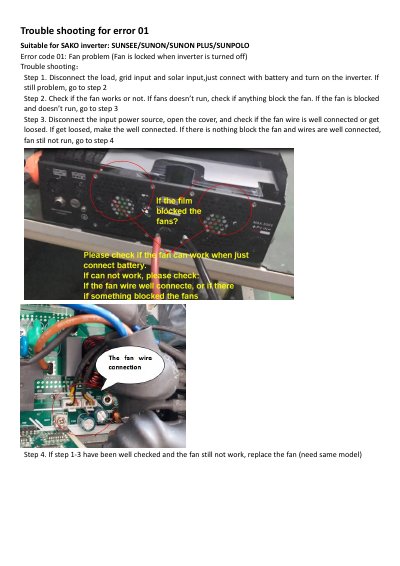
This guide covers troubleshooting for error code 01 on SAKO SUNSEE, SUNON, SUNON PLUS and SUNPOLO inverters. It describes checks for fan operation and wiring, followed by fan replacement if the earlier steps do not resolve the problem.

What's inside

  • Trouble shooting for error 01
  • Suitable inverter models
  • Error code 01 fan problem
  • Step 1 disconnect load and inputs
  • Step 2 check fan operation
  • Step 3 check fan wiring
  • Step 4 replace fan

Frequently asked questions

What does error code 01 indicate on these SAKO inverters?

Error code 01 indicates a fan problem, specifically that the fan is locked when the inverter is turned off.

Which SAKO inverter models does this troubleshooting guide apply to?

It applies to SAKO SUNSEE, SUNON, SUNON PLUS and SUNPOLO inverters.

What should be done if the fan still does not run after the checks?

Replace the fan with the same model.

Download PDF (365 KB)