
This guide explains how to wire the Sage Prime BACnet meter to an MS/TP network, configure settings, and use SageCom software.
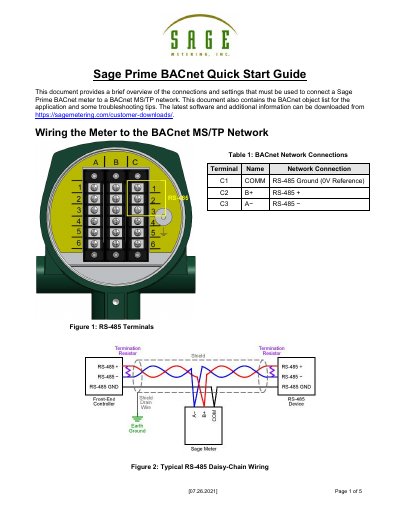
This document provides instructions for connecting a Sage Prime BACnet meter to a BACnet MS/TP network, including wiring diagrams and default network settings. It details how to configure parameters such as baud rate and MAC address using a BACnet client.
| Default Baud Rate | 9600 |
|---|---|
| Default MAC Address | 49 |
| Default Device Instance | 1142049 |
| Default APDU Timeout | 1000 |
| Default Max Info Frames | 1 |
Settings can be configured using any BACnet client, such as Yet Another Bacnet Explorer (Yabe), by writing to properties of the meter's BACnet Device object.
Connect to the meter via BACnet, write a value of 1 to Binary Value 101 'Enable SageCom', power off the meter, disconnect the BACnet wiring, connect a PC running SageCom, and power on the meter.
Terminal C1 connects to COMM (Ground), C2 to B+ (RS-485 +), and C3 to A- (RS-485 -).