
Rextron VSAMV-021 converts HDMI or VGA plus analog audio to VGA plus analog audio, with EDID configuration and resolutions up to 2048 x 1152.
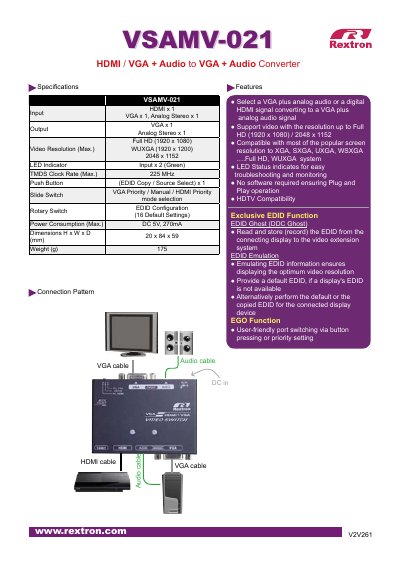
The Rextron VSAMV-021 is an HDMI / VGA + Audio to VGA + Audio converter. It takes either a VGA plus analog audio signal or a digital HDMI signal and converts it to a VGA plus analog audio output. Video is supported up to Full HD (1920 x 1080), WUXGA (1920 x 1200) and 2048 x 1152, and the unit is described as compatible with popular screen resolutions from XGA and SXGA to UXGA, WSXGA, Full HD and WUXGA.
The converter has two green input LEDs for status monitoring, a push button for EDID copy and source select, a slide switch for VGA Priority / Manual / HDMI Priority mode selection, and a rotary switch for EDID configuration with 16 default settings. EDID Ghost reads and stores the EDID of the connected display, and EDID Emulation provides a default or copied EDID so the optimum video resolution is shown. No software is required for plug-and-play operation.
| Input | HDMI x 1, VGA x 1, Analog Stereo x 1 |
|---|---|
| Output | VGA x 1, Analog Stereo x 1 |
| Video Resolution (Max.) | Full HD (1920 x 1080), WUXGA (1920 x 1200), 2048 x 1152 |
| TMDS Clock Rate (Max.) | 225 MHz |
| Power Consumption (Max.) | DC 5V, 270mA |
| Dimensions (H x W x D) | 20 x 84 x 59 mm |
| Weight | 175 g |
| LED Indicator | Input x 2 (Green) |
| Slide Switch | VGA Priority / Manual / HDMI Priority mode selection |
| Rotary Switch | EDID Configuration (16 Default Settings) |
It supports video up to Full HD (1920 x 1080) and 2048 x 1152, with WUXGA (1920 x 1200) also listed in the specifications.
No. The converter needs no software and is a plug-and-play device.
The rotary switch provides EDID configuration with 16 default settings.
It reads and stores the EDID from the connected display to the video extension system.