
User manual for the Ralan X9 wireless game controller covering Android, iOS, PC, Bluetooth and USB connections, Turbo, mouse mode and charging.
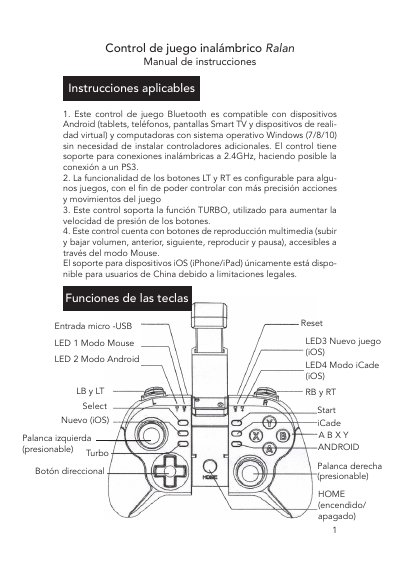
The Ralan X9 is a wireless Bluetooth game controller for Android devices and Windows 7/8/10 computers, with 2.4 GHz wireless support for connecting to a PS3. It can also use iCade mode for iOS devices, which the manual states is available only to users in China due to legal limitations.
The manual explains key functions, Android and iCade pairing, wired USB and Bluetooth PC connections, switching between PS3 and X-Input modes, Turbo, multimedia controls in mouse mode, and charging and sleep behavior. It also lists electrical characteristics and compatible games. This manual is written in Spanish.
| Operating voltage | 3.7 VDC |
|---|---|
| Operating current | 25 mA |
| Continuous use time | 10 hours |
| Sleep mode current | <10 uA |
| Charging voltage/current | 5 VDC / 500 mA |
| Bluetooth transmission distance | <= 8 m |
| Battery capacity | 380 mAh |
| Battery duration in sleep mode | Approx. 30 days from full charge |
Hold ANDROID + HOME simultaneously for two seconds, turn on Bluetooth on the Android device and select “Ralan X9”.
In wired USB mode, hold the HOME button for three seconds; LED3 turns on in X-Input mode.
Press the button you want to assign Turbo to, then press the TURBO button.
The Bluetooth transmission distance is up to 8 meters.