
Pandora SMART v3 car security system user manual covering programming levels, device pairing, PIN codes, emergency functions, and wiring.
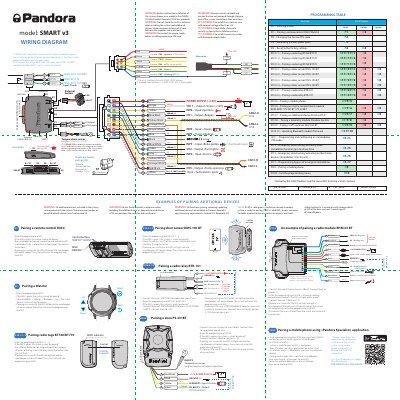
The Pandora SMART v3 manual explains how to enter programming levels with the VALET button and how to pair a remote control, Watch2, radio tags, a door sensor, a radio relay, a mobile phone, an engine compartment module, a telemetry module, and a GPS receiver. It also covers changing the service PIN-code, recording idle speed, factory reset, and emergency immobilizer functions.
The document includes a wiring diagram for the SMART v3 base unit and installation warnings about +12 V power, antenna spacing, SIM-card handling, and fuse requirements. Pairing examples show LED and beeper confirmations and state the maximum number of paired Bluetooth devices.
| Maximum paired Bluetooth devices | 14 |
|---|---|
| Vehicle nominal voltage | 12 V |
| Bluetooth | BLE 4.2 |
| Cellular antenna | GSM/GPRS/3G/4G LTE |
| Minimum spacing between modules and metal parts | 20 mm |
| Pandora Specialist app minimum requirements | Android 4.4, Bluetooth 4.0 |
Enter programming level No. 1, check that the LED is green, then hold three remote-control buttons simultaneously for 1 second until a short beep.
No more than 14 paired Bluetooth devices are allowed.
The app requires Android 4.4 and Bluetooth 4.0.
Press and hold the VALET button until 5 siren/beeper signals or 5 LED blinks.