
Release notes for NUUO NVRsolo Plus firmware versions 3.6.2 through 3.11.0.16, detailing bug fixes, enhancements, and supported software versions.
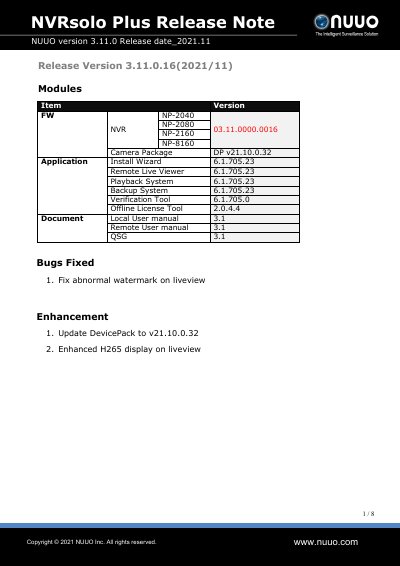
This document serves as a release note for the NUUO NVRsolo Plus series of Network Video Recorders. It provides a historical record of firmware updates ranging from version 3.6.2 to 3.11.0.16, released between December 2017 and November 2021.
Each entry in the document details specific changes for a particular release, categorized into 'Bugs Fixed' and 'Enhancement'. These updates address security vulnerabilities (such as CVEs), resolve connectivity issues with specific camera models, and improve system stability and features like H265 display and SMTP services. The document also lists the corresponding version numbers for associated software packages, including DevicePack, Install Wizard, and various viewer and backup systems.
| Supported Models | NP-2040, NP-2080, NP-2160, NP-8160 |
|---|---|
| Latest Firmware Version | 3.11.0.16 |
| Latest Release Date | 2021/11 |
| Supported Camera Package Version | v21.10.0.32 |
| Supported Application Install Wizard Version | 6.1.705.23 |
The latest firmware version listed in this document is 3.11.0.16, released in November 2021.
This document covers the NP-2040, NP-2080, NP-2160, and NP-8160 models.