
A quick operation guide for the NSK Surgic Pro2 surgical device, covering setup, battery installation, and pairing with external devices.
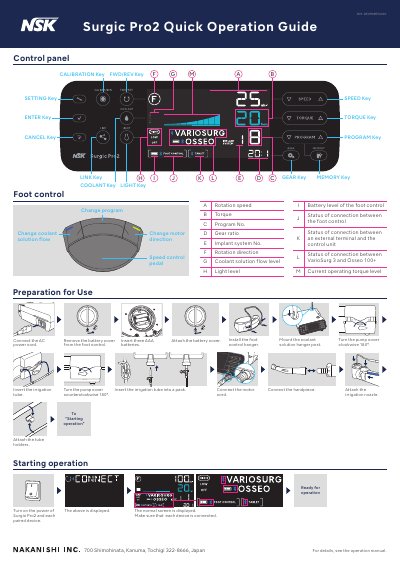
This document provides a step-by-step guide for preparing and starting the NSK Surgic Pro2. It details how to connect power, install batteries in the foot control, mount hangers, and attach irrigation tubes and handpieces before operation.
The guide also explains procedures for pairing the device with other units such as Osseo 100+, VarioSurg3, and external terminals using both physical keys and a mobile app. It includes instructions for calibration and notes on battery status indicators.
You must insert three AAA batteries into the foot control.
You need to press and hold the operating key for at least 3 seconds.
Pairing can be completed within 10 minutes after inserting the battery.