
North Building Technologies Hiross OSM v20 Product Engineering Guide

Product engineering guide for installing and configuring the North Building Technologies Hiross OSM v20 with ObServer.

North Building Technologies Hiross OSM v20 Product Engineering Guide - cover page
Brand
North Building Technologies
Category
Other Electronics
Document type
Installation Guide
Language
English
Pages
3
File format
PDF
File size
127 KB
Published
17 November, 2026
Updated
17 November, 2026
MD5 checksum
541EAFB9F34566C7B351D18A7A14C444

About this manual

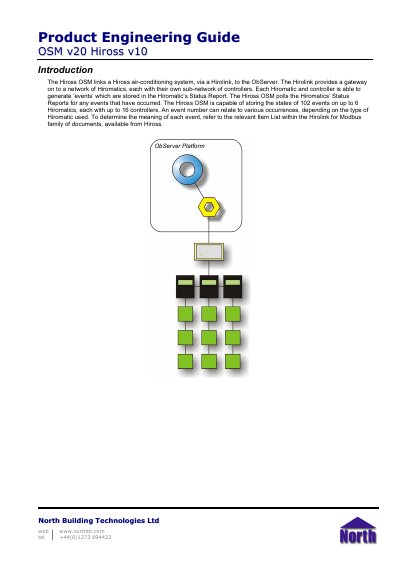
This guide explains how the Hiross OSM connects a Hiross air-conditioning system, through a Hirolink, to the ObServer platform. It covers installation, Hirolink configuration, COM port connection, ObServer channel assignment, OSM configuration, and access to Hiross system objects.

The Hiross OSM can store the states of 102 events across up to 6 Hiromatics, each with up to 16 controllers. Reference information includes Hirolink jumper settings, cable specifications, and the objects created in ObServer when the OSM is loaded.

What's inside

  • Introduction
  • Step 1 – Install OSM
  • Step 2 – Configure Hirolink
  • Step 3 – Connect COM Port to Hirolink
  • Step 4 – Plug in Hiross OSM to ObServer
  • Step 5 – Configure Hiross OSM
  • Step 6 – Access Objects within the Hiross System
  • Reference
  • Cable Specification
  • Objects

Specifications

Event storage capacity102 events
Supported Hiromaticsup to 6
Controllers per Hiromaticup to 16
Maximum cable length15 m

Frequently asked questions

How many events can the Hiross OSM store?

It can store the states of 102 events on up to 6 Hiromatics, each with up to 16 controllers.

How is the Hiross OSM installed?

It is installed automatically with all ObSys editions.

What is the maximum cable length between the COM port and the Hirolink?

The maximum cable length is 15 m.

Download PDF (127 KB)

More North Building Technologies Manuals


View all North Building Technologies manuals →