
User manual for NEWONE's portable CD player with radio and AUX input, covering operation, power, maintenance, and safety.
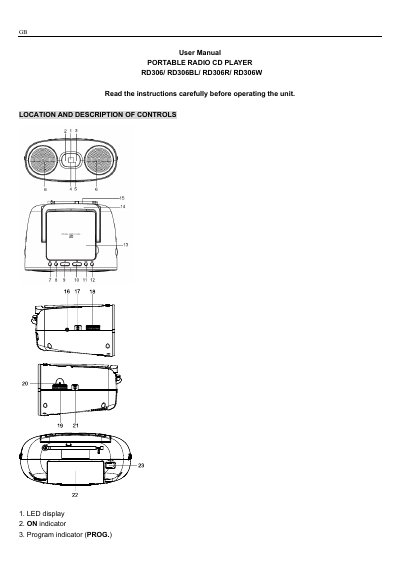
This user manual explains how to operate the NEWONE RD306 portable CD player, including turning it on/off, using radio and CD playback, and connecting auxiliary devices. It also covers power options (AC or 6x batteries), maintenance, and safety precautions. The device supports FM and MW radio bands and includes a telescopic antenna for better reception. Safety warnings are included for battery handling, moisture, and laser radiation.
| Power Supply | AC 230V~50Hz or 6x1.5V R14/UM-2/"C" batteries |
|---|---|
| Radio Frequency Range | FM 88-108 MHz, MW 540-1600 kHz |
| CD Frequency Response | 100Hz - 20kHz |
| Signal-to-Noise Ratio | 40dB |
| AUX Input | 3.5mm AUX jack |
Slide the Function switch to CD/AUX or RADIO to turn on; slide to OFF to turn off. The ON indicator will light up when on and turn off when off.
Slide the Function switch to CD/AUX, insert the CD with label up, close the door, and press to start playback. The current track number will show on display.
Press the REP. button once to repeat the current track. Press it twice to repeat all tracks. Press it again to cancel repeat.
Turn off the unit, unplug the AC cord, and reconnect it. Also, clean the CD disc with a cleaning cloth.